
Bring Your Own Context: Building a Hyperion Planning Docker Image
Let me be upfront: on-premises Hyperion Planning is old software. It predates Oracle buying Hyperion, Oracle’s future for Planning is the cloud, and there isn’t really an on-prem product left to move to. I’m not under any illusion that it’s modern. But a customer still runs it, on 11.2, and supporting them means jumping through some hoops.
This post is about one of those hoops. There’s now a Hyperion Planning 11.2 Docker image. Run
docker compose up, wait about twenty minutes, and you’ve got Workspace, Shared Services, Planning,
Calculation Manager and Essbase running against SQL Server, with the Vision sample app a few clicks
away.
I didn’t write it. Claude did.
I’ve been telling people that Claude one-shotted it, and from where I sat, that’s true: I described what I wanted, pointed it at the right material, and later came back to a working image. What happened in between is the part I want to talk about. (The build scripts are on GitHub. More on that at the end.)
Why a software company wants this
Old as it is, Oracle still supports 11.2 and still patches it: the 11.2.26 update shipped this year. I wanted to look into a use case for that customer with our product, and for that I needed a Planning server. Historically, that means a VM or a precious dev server that nobody dares break. Back in 2019, when I put Essbase on Docker, I listed the trouble with Essbase VMs: 40 to 80 GB each, networking that falls over when you change networks, and a habit of getting less stable over time. I also wrote that, for a software company, a big draw of Docker was keeping an image for each patch level and switching between them. Nothing about that has changed.
What has changed is the cost. Building this image by hand would have taken me weeks, and that’s a hard sell for one customer on software whose future is the cloud.
What I handed it
Here’s what Claude started with:
- The install media. There’s no full installer for 11.2.26: you install 11.2.15, then apply 11.2.26 on top of it as a cumulative patch. So we staged both, about 15 GB for 11.2.15 and 6.7 GB for the update, plus Oracle’s documentation. That’s a lot of media, but that’s okay.
- My old work. My 11.1.2.4
docker-essbaseimage, and my fork of Oracle’s Essbase 21c reference scripts from the Essbase 21 guide. - One paragraph of direction. Use the Vision sample app, configure on first start, skip Financial Reporting, and get as close as possible to a ready-to-go image. If something absolutely needs the web UI, document the steps.
It took the shape of the project straight from my 11.1.2.4 image: install and patch during the build, configure the first time the container starts, and run SQL Server alongside it in a compose file. My old work turned out to be the most useful part of the prompt.
And it needed both of my old images. I’d assumed Planning 11.2 still used Essbase 11.1.2.4, but since 11.2.15 it ships with Essbase 21c, running in its own WebLogic domain. So my 11.1.2.4 image covered the EPM installer and configurator, and my 21c scripts covered the Essbase underneath.
With the media staged, Claude finished the job without me. That took a little under five hours, but most of it was Oracle’s installer and patcher grinding away under emulation on my Mac. The actual figuring-out was maybe an hour and a half. The only thing it asked of me was to raise Docker’s build-cache limit, after the cache threw away the 41-minute install layer twice. Even then, it asked me to change the setting myself rather than edit my Docker configuration.
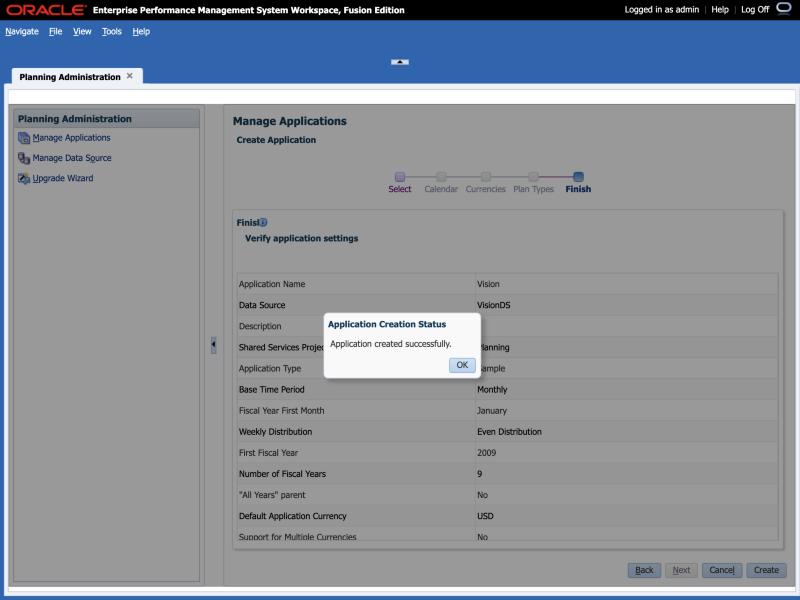
Creating Vision still has to happen in Workspace, so Claude wrote up the steps. Then, to prove they worked, it opened a browser and followed them itself on a fresh container:
It read everything
This is the part that impressed me most. Here’s some of what Claude went through:
- Oracle’s documentation: the 296-page install guide, the 11.2.26 readme and the certification matrix. It also sent a separate agent to research Oracle’s public docs while it read the media.
- The installer itself: its product tree, and a silent-install template and XML schema tucked inside one of its jar files. From those it generated the install response file without ever running Oracle’s graphical installer.
- Everything after: OPatch logs, the Shared Services registry tables in SQL Server, ODBC config files, WebLogic logs.
That thoroughness found three Oracle problems:
- Every EPM product patch in the 11.2.26 update failed, in seconds. Rather than rebuilding and
trying again, Claude saved the 41-minute install as its own image and reproduced the failure in a
container in a few minutes. The cause: the old OPatch inside the EPM home won’t run without a
Middleware/utilsdirectory, and this install never creates one. An empty directory fixed it. - Workspace returned a 500 error. The Essbase 21c configuration registers Provider Services
without a
contextproperty, and the configurator’s web server step crashes on it. The container now adds the property and runs that step as a second pass. - Oracle’s documented fix missed the real problem. Building Vision on SQL Server is a known
issue in the readme, which says to point the ODBC driver at its newer version. The real cause was
in Essbase’s driver configuration: a bare file name in one file, and a path on Oracle’s own build
machine (
/u01/app/dist) hard-coded intoodbcinst.ini.
One piece still needed a GUI: Oracle’s configurator has to be recorded once through its wizard. So Claude set up a Linux desktop in a container, served it to a browser with noVNC, and clicked through the wizard itself. When keystrokes started getting dropped under emulation, it slowed down its typing. I had never heard of noVNC. It’s amazing.
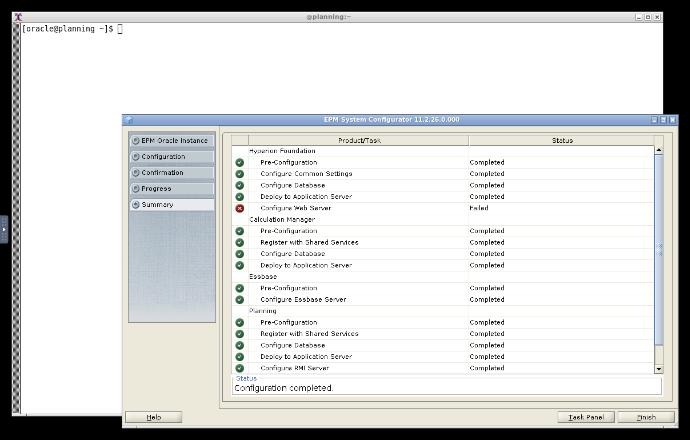
Here’s how that recording run ended. The one red X is the web server step behind the Workspace 500 error above. The container now fixes the registry first, and its unattended first start passes every step:
None of this is beyond a person. I could have done every one of these steps, and I’ve done plenty like them over the years. What Claude brought was thoroughness. It reads everything, every time, without getting bored or deciding a thread isn’t worth following. A couple of days later, to settle whether one parameter in Planning’s REST API could ever work for business rules, it searched every jar in Planning, Foundation and Calculation Manager. I can’t imagine ever choosing to do that by hand.
What disposable Planning buys you
Now docker compose up creates a Planning server and docker compose down -v throws it away. No VM
snapshots, no dev server to protect.
You can hear the difference in how I talked to Claude afterwards. When it asked which business rule it should run as a test, I told it:
This is all completely ephemeral data, and if we mess something up, just try a different rule. And we can always bounce the server, so it’s no big deal.
Nobody talks that way about a precious dev server.
That freedom is what let us get to the actual customer question over the next couple of days: how a business rule can be launched remotely, and as which user. That’s a story for another post.
It’s the context
Claude was very good here, but the reason it worked was what I gave it: the media, Oracle’s docs, and years of my own Docker work for a related product. I’m still learning which tasks to hand to AI. This was the clearest lesson I’ve had: gather the context first. Prior art, real media and real docs matter more than how cleverly you word the request.
I didn’t build those Essbase images in 2019 with this in mind, but that’s how they paid off.
From a USB stick to docker compose up
Everything I had on a computer 25 years ago would fit comfortably on a single USB stick today. Not that long ago, running a whole server inside a VM was state of the art and a real strain on a laptop. Docker was a big investment of time for me, and I’m glad I made it. Now I can hand the whole job to an AI. The newest tools keep turning out to be great at reviving the old ones.
As for the image itself, I can’t publish it: it contains Oracle’s licensed software. But the build
scripts are open source, under the Apache 2.0 license, at
appliedolap/docker-planning. You bring your own
Oracle media, the same way docker-essbase works. If you’re still running Planning 11.2 on-prem and
give it a try, I’d like to hear how it goes.