jason w. jones

software from the trenches

New Substitution Variable Methods/CLI in PBJ

Just a few additions to the PBJ (PBCS REST API Java Library) regarding substitution variables. All of the new functionality is added to the PbcsApplication interface, for now. Since variables can exist in a specific plan type, it may make sense in the future to add a new interface/implementation that models a specific plan type. Anyway, here are the four new methods for now:


	/**
	 * Gets all substitution variables in the application
	 * 
	 * @return a list of the substitution variables, an empty list if there are
	 *         none
	 */
	public Set<SubstitutionVariable> getSubstitutionVariables();

	/**
	 * Fetch a substitution variable with a particular name from this
	 * application
	 * 
	 * @param name the name of the variable to fetch
	 * @return the variable object, if it exists
	 * @throws PbcsNoSuchVariableException if the variable does not exist
	 */
	public SubstitutionVariable getSubstitutionVariable(String name);

	/**
	 * Update a set of substitution variables. This does not replace all of the
	 * variables in the application, it just updates the ones that have been
	 * specified in the collection (contrary to what the REST API docs seem to
	 * imply)
	 * 
	 * @param variables the variables to update
	 */
	public void updateSubstitutionVariables(Collection<SubstitutionVariable> variables);

	/**
	 * Convenience method to update a single substitution variable value.
	 * 
	 * @param name the name of the variable
	 * @param value the value of the variable
	 */
	public void updateSubstitutionVariable(String name, String value);

A few things to note:

  • The getSubstitutionVariables method returns a Set<SubstitutionVariable>, as opposed to a List. Since a variable should be unique with respect to its combination of plan type, name, and value, a Set makes a little more sense here because the ordering implied by a List is irrelevant
  • All methods work with/return a SubstitutionVariable object. This is a new POJO class with three fields: planType, name, and value.
  • You can fetch just a single substitution variable by name as a convenience method. Although there is a technically a specific REST API endpoint for doing so, right now it just calls the other method and filters it.
  • You can update a set of variables
  • As a convenience, you can update a single variable/value for all plan types using the updateSubstitutionVariable(String name, String value) method.

The PBJ CLI (an “über” JAR that is runnable an implements a basic CLI to PBCS) has also gotten a couple of updates to reflect the new capabilities in the library. For example, you can quickly list all variables in an app:

java -jar pbj-pbcs-client-1.0.4-jar --conn-properties pbcs-client.properties list-variables --application=Vision

And get a list back:

ALL,NextPd,FY15
ALL,CurrPd,FY14

And as an added bonus, you can even provide your own format string if you want. This might help for people doing automation and need to get the data into a particular format with having to do some weird batch/shell string tweaks:

java -jar pbj-pbcs-client-1.0.4-jar --conn-properties pbcs-client.properties list-variables --application=Vision --format=%s|%s|%s%n
ALL|NextPd|FY15
ALL|CurrPd|FY14

All For Now

These latest updates are in the 1.0.4 branch of the PBJ GitHub repository. You can clone it and build your own copy of the library and runnable CLI JAR (if you’re so inclined) by checking that out. Eventually this branch will be merged into the master, pending more testing.

Understanding the Outline Extractor Relational Extraction Tables

I was going to do a nice in-depth post to follow up on my discussion of the relational cache outline extraction method/improvements on the Next Generation Outline Extractor, but someone already beat me to the punch. It turns out that the tool’s primary author, Tim Tow, blogged about the technique and the tables for ODTUG a couple of years back.

I’ll just add on one thing that I wanted to highlight, though: the general technique behind most relational extractions from an Essbase outline is to generate a single table, with such common columns as PARENT, CHILD, ALIAS, UDA, STORAGE, CONSOLIDATION, and so on. If you think about this, it tends to imply a number of limitations that might make this technique unfeasible for you:

  1. The table can only hold one extraction at a time
  2. You can only get the member name and a certain alias table alias at a time
  3. The columns in the table are variable based on the attribute dimensions that may be associated with the dimension
  4. More than one UDA: ¯\_(ツ)_/¯

Since the relational cache extraction method was designed for robust, flexible, and quick use with Dodeca, it is structured a little differently than traditional extracts. The additional aliases, attribute associations, and UDAs are all in separate tables, allowing for arbitrary and complete extractions of such data (in tables CACHED_OUTLINE_MEMBER_ALIASES, CACHED_OUTLINE_MEMBER_ATTRIBS, and CACHED_OUTLINE_MEMBER_UDAS respectively).

Additionally, each version of an outline is extracted and given a unique ID as well, meaning that you can extract an outline over and over again to the same tables without having to necessarily clear the table beforehand. This again stands in contrast to the typical extraction format that is essentially one extraction in a table at a time (although if you choose to then merge that in to a separate table with a unique ID, you can).

In any case, I keep finding myself surprised at just how many people are using the relational extraction technique as part of their automation and day to day solutions, including techniques related to automated outline change comparisons, quasi-DRM solutions, and shuffling data around the enterprise for consumption in other solutions.

Essterm: Terminal-based ad hoc client for Essbase

Remember the last time you thought, “You know, Excel is just a little too modern, I wish I could do multi-dimensional analysis using my keyboard, in a terminal, the way the Pilgrims did it.”

Me neither.

Yet, here we are.

I was going to originally throw this over the fence release this as a bit of an April Fool’s joke, but I didn’t have quite enough time. I actually showed this off to the fine folks at my Collaborate session last month, and believe it or not, some of the people there thought it had some interesting use-cases.

Why Essterm?

As part of my research for a different project, I came across a Java library called Lanterna. Lanterna allows for implementing interfaces in a terminal. It’s like Java’s Swing (GUI) library, but for text. One of the interesting use cases for this is that you can SSH into a Linux server from Linux/Windows/macOS/whatever and run it through the terminal. So I started playing around with the widgets that are available in the library – text input areas, labels, buttons, list boxes, tables, dialogs, and so on, wiring it up to Essbase, and well, here we are:

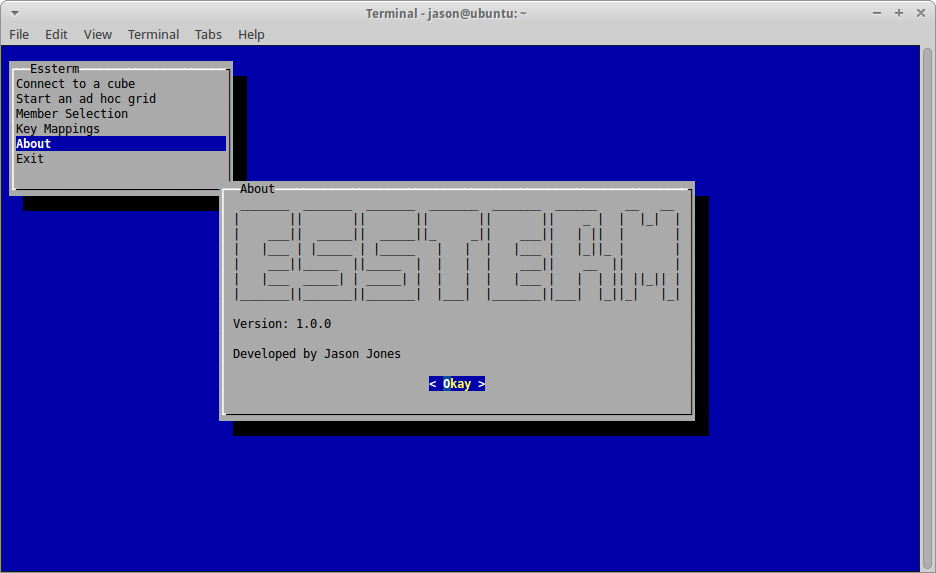
I’ve been pretty happy with the text-based GUI capabilities of the Lanterna library, including my ability to wire up a GUI for such things as a little About dialog:

The Essterm About dialog

Connecting to a server/application/cube:

Selecting an Applicatin/Cube in Essterm

Performing ad hoc operations:

Ad hoc on Sample/Basic with Essterm

And building an options dialog:

Ad hoc options management in Essterm

As you can see in the short video, Essterm is packaged as un “uber-jar” that is runnable. This has been my preferred way to distribute Java applications lately since it lets you get away from boring class path issues and batch/shell files that have to try and invoke Java in just the right way. I really like being able to just run a JAR file and not have to worry about anything else.

Next Steps

As with many other things I work on, Essterm is a bit of a side project. And the business of Making Essbase Even Better in an official capacity comes first. But if you are interested in playing with Essterm, please feel free to contact me for the proper files. I’d be curious for your feedback. I am thinking sometime later this year I will just release it as an open-source project for anyone at all that wants to use it or make something with it.

Next Generation Outline Extractor version 2.1.3: Relational extraction enhancements

We’ve made some enhancements to the Next Generation Outline Extractor to incorporate user feedback and requests. The main improvement to this newest release, version 2.1.3, is with the way that relational database extractions are handled. More specifically, the storing of relational credentials has been improved so that they are no longer stored in cleartext. This will lead to improved security for organizations using this functionality in their automation. Additionally, the configuration for relational extractions has been simplified a bit. There is now no longer a need to edit the persistence.xml file, rather, everything is stored in the main properties file.

As part of this  post, I want to go over how the new functionality works, including a full “soup to nuts” use case. I think a lot of people use the outline extractor for “one-off” extractions, although a lot of people might be unaware that it can just as easily be used to quite easily automate extractions.

So, let’s dive in. I’m going to be using an internal build (i.e., running the extractor directly from my Java IDE), which is why the version is listed as “internal”. Also, I’m running on a Mac, where the UI looks a little different. The main difference is with the rendering of the tabs. On Windows the tabs for the UI are on the left side. However, on a Mac this is curiously rendered on the left side but the tabs are not rotated. So don’t be alarmed by the funky UI – it works fine and looks “normal” on Windows.

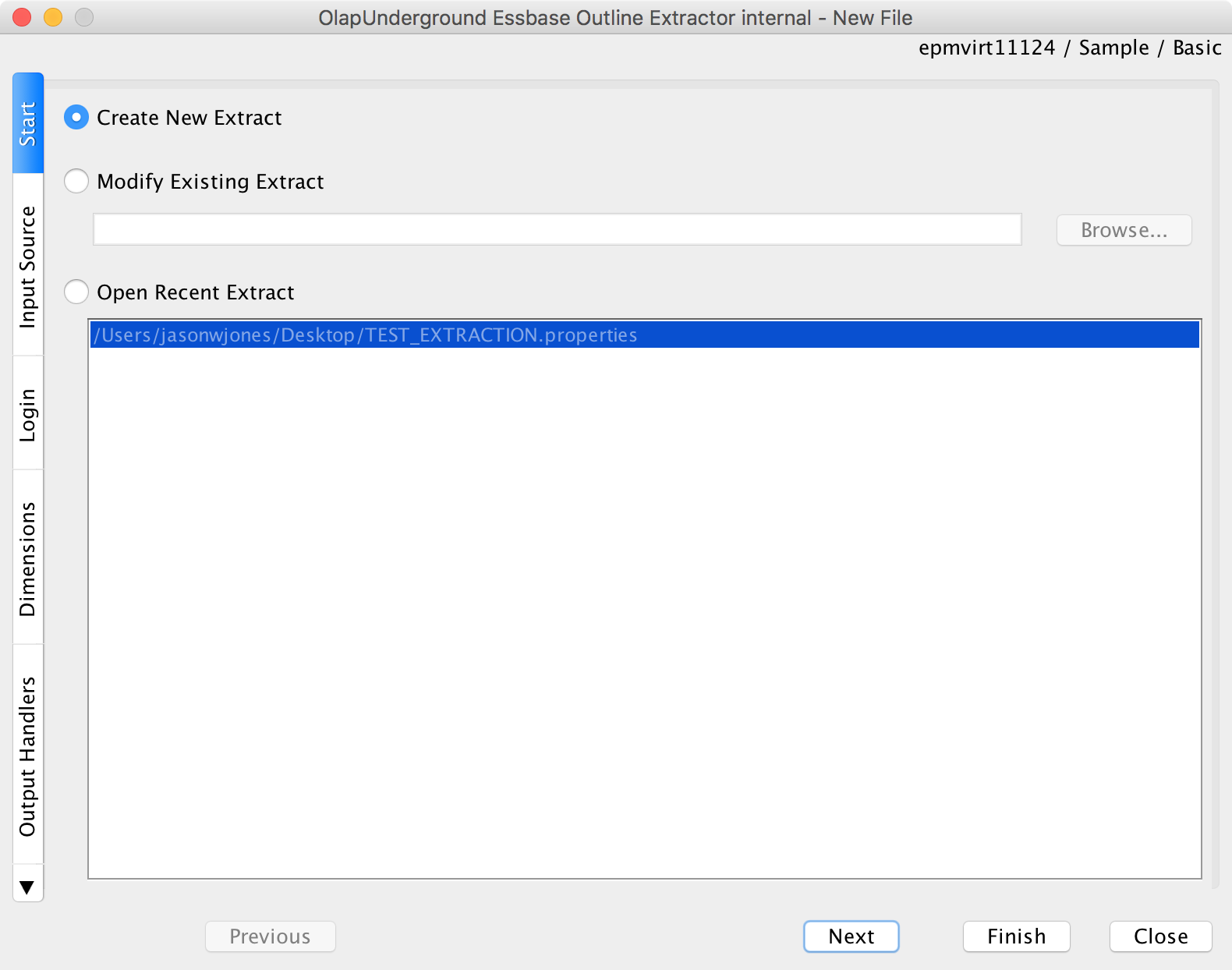
First, we launch the extractor’s UI. We’re going to create a new extraction definition:

Creating a new Essbase Extraction

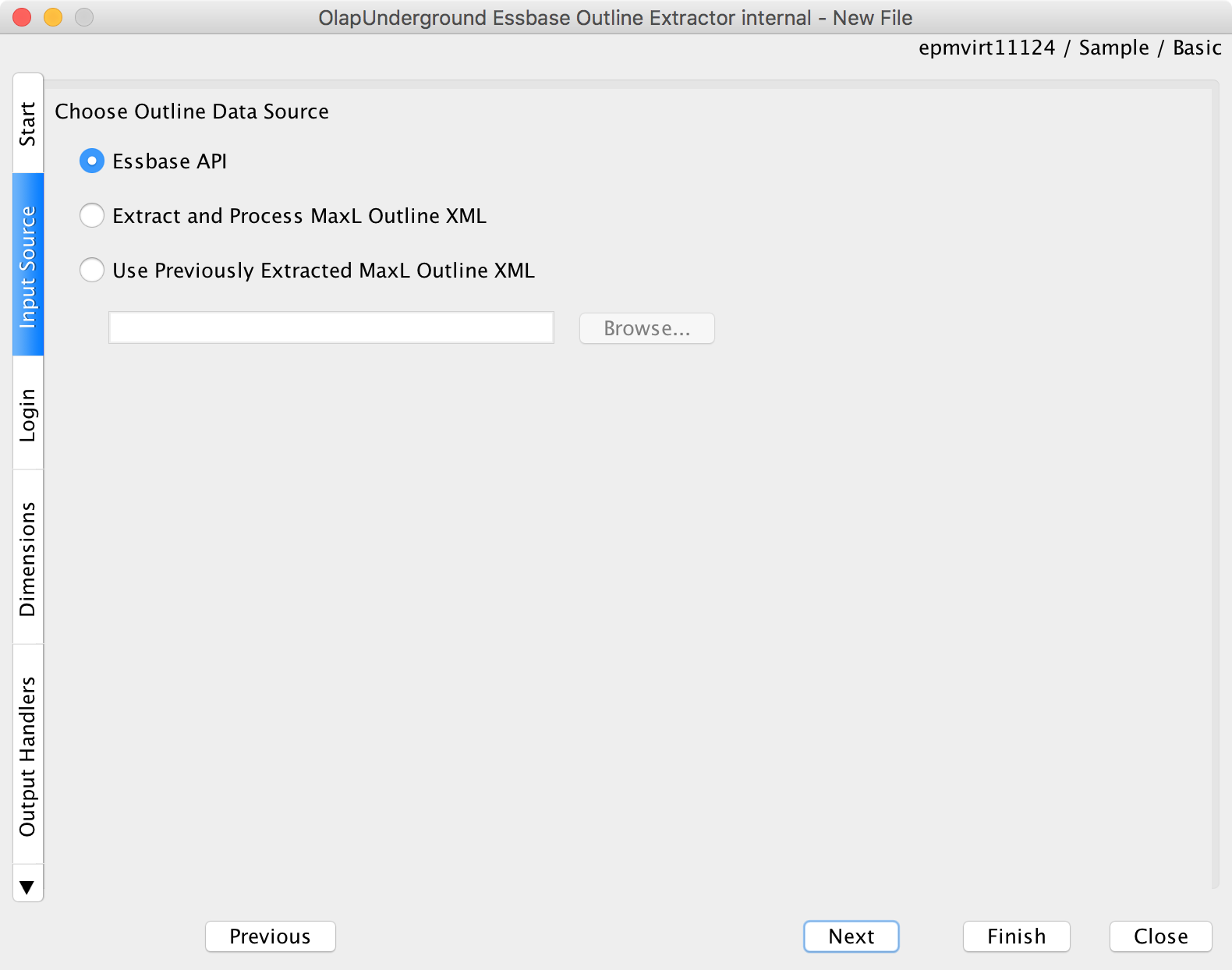
Next, we’ll choose the source of the outline data. For this I’m just going to use the Essbase API. Note that the “MaxL” extraction can be much, much faster, assuming your version of Essbase supports it.

We’ll extract using the Essbase API (note: MaxL can be much faster)

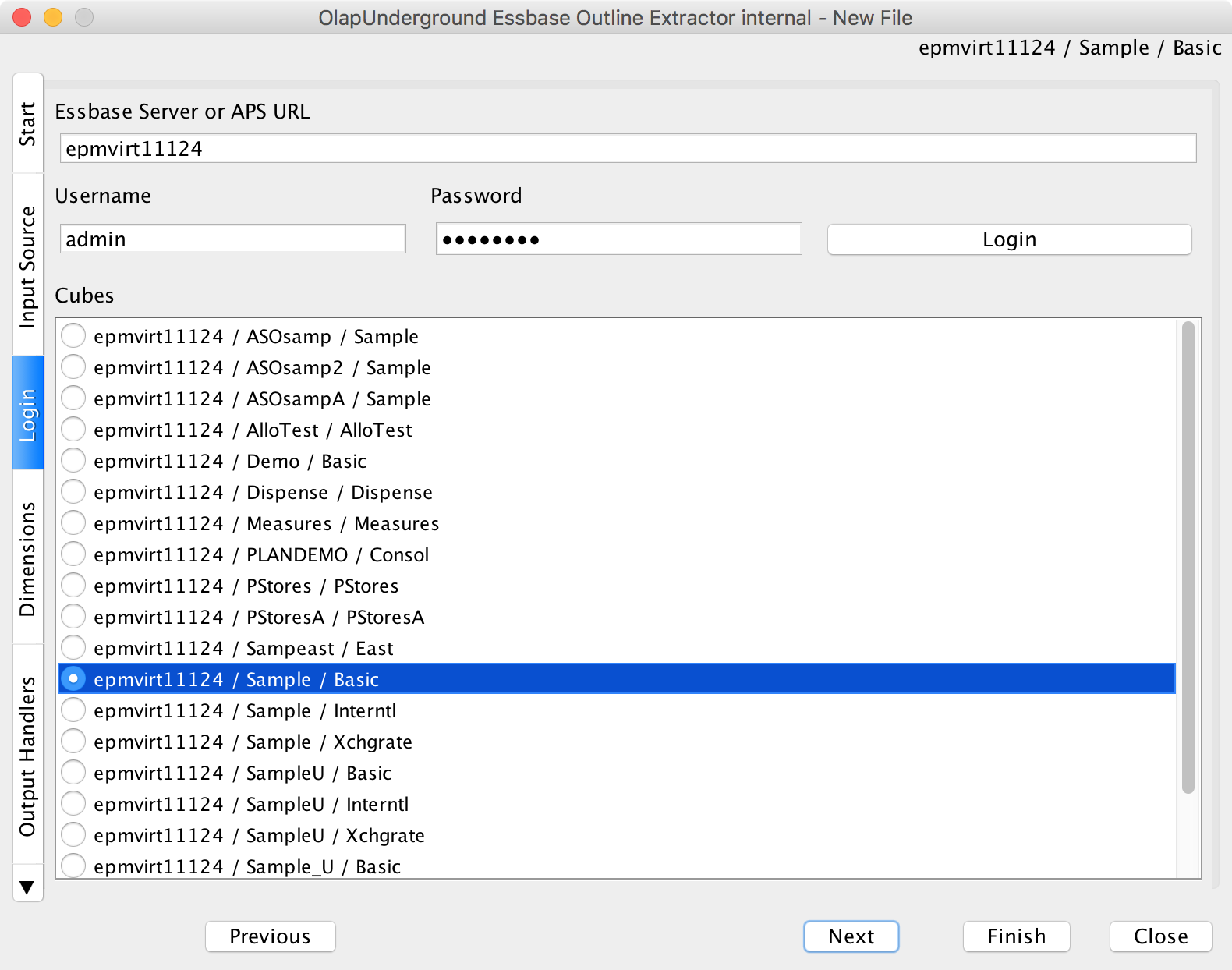
We’ll login to an Essbase server and choose a cube:

Choose an Essbase server/cube

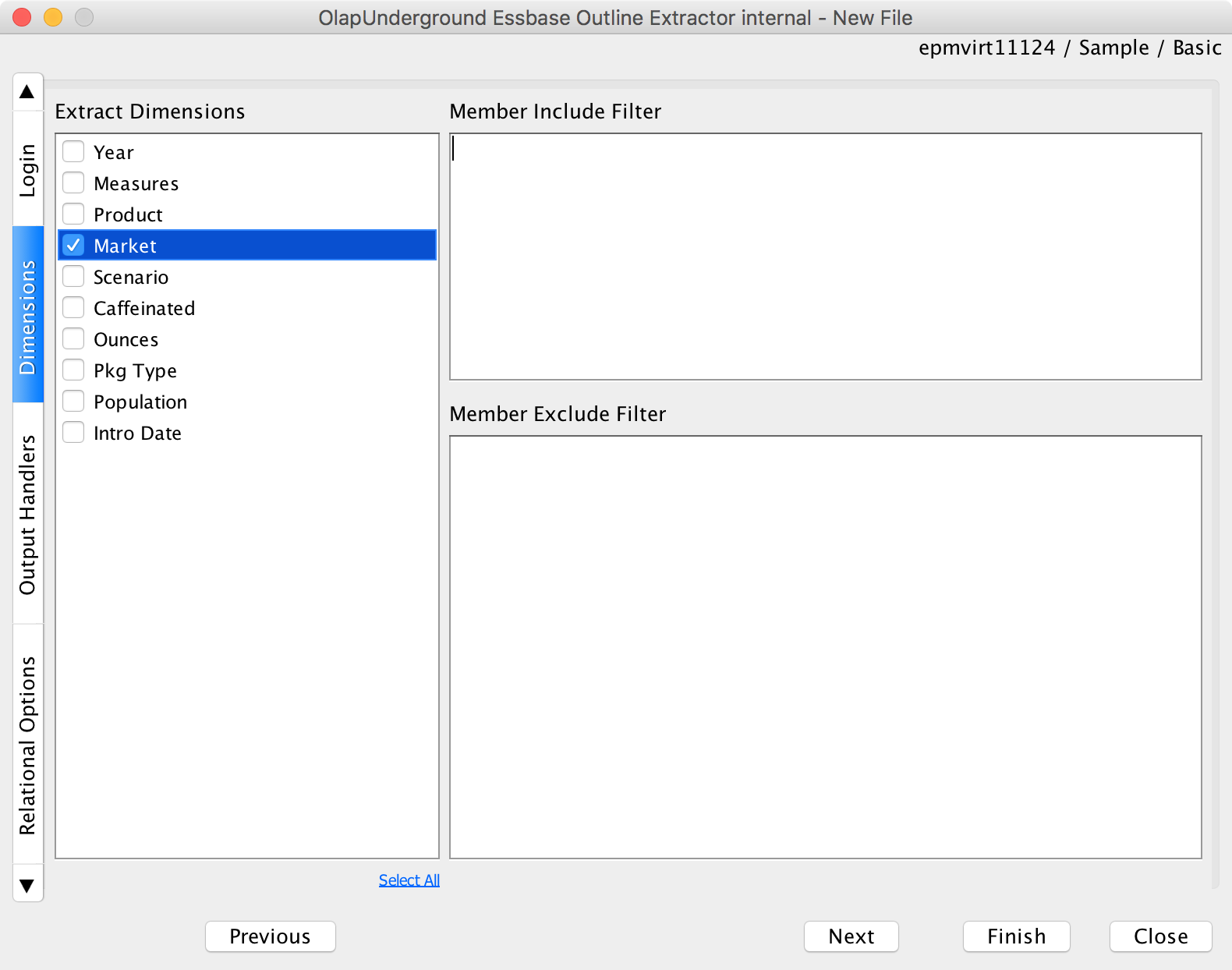
Then choose any/all dimensions to extract:

Choose one or more dimensions

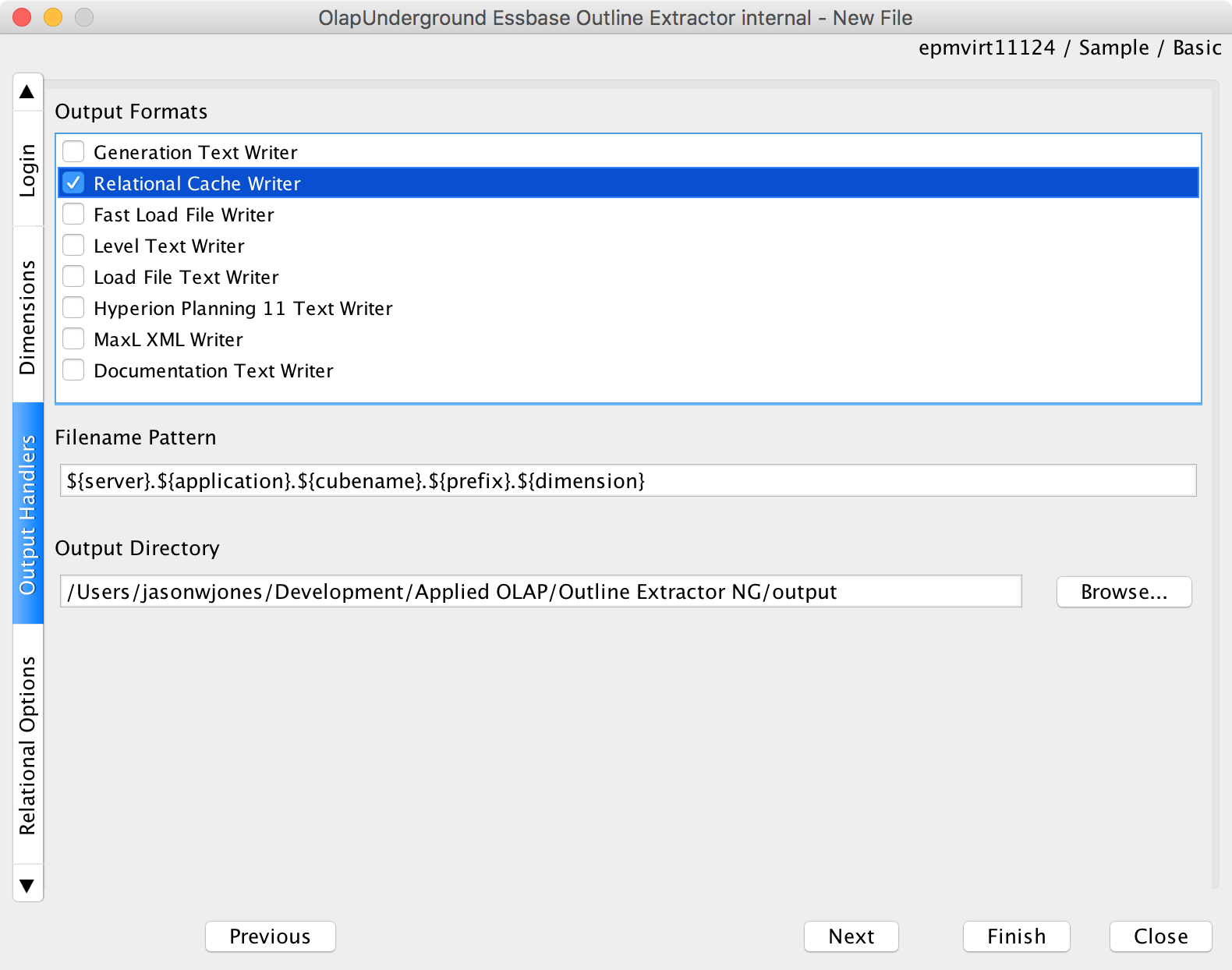
Now we can choose our extractor(s). As this post is focused on the relational extraction, I’ll just choose the Relational Cache Writer only:

Pick the relational cache writer

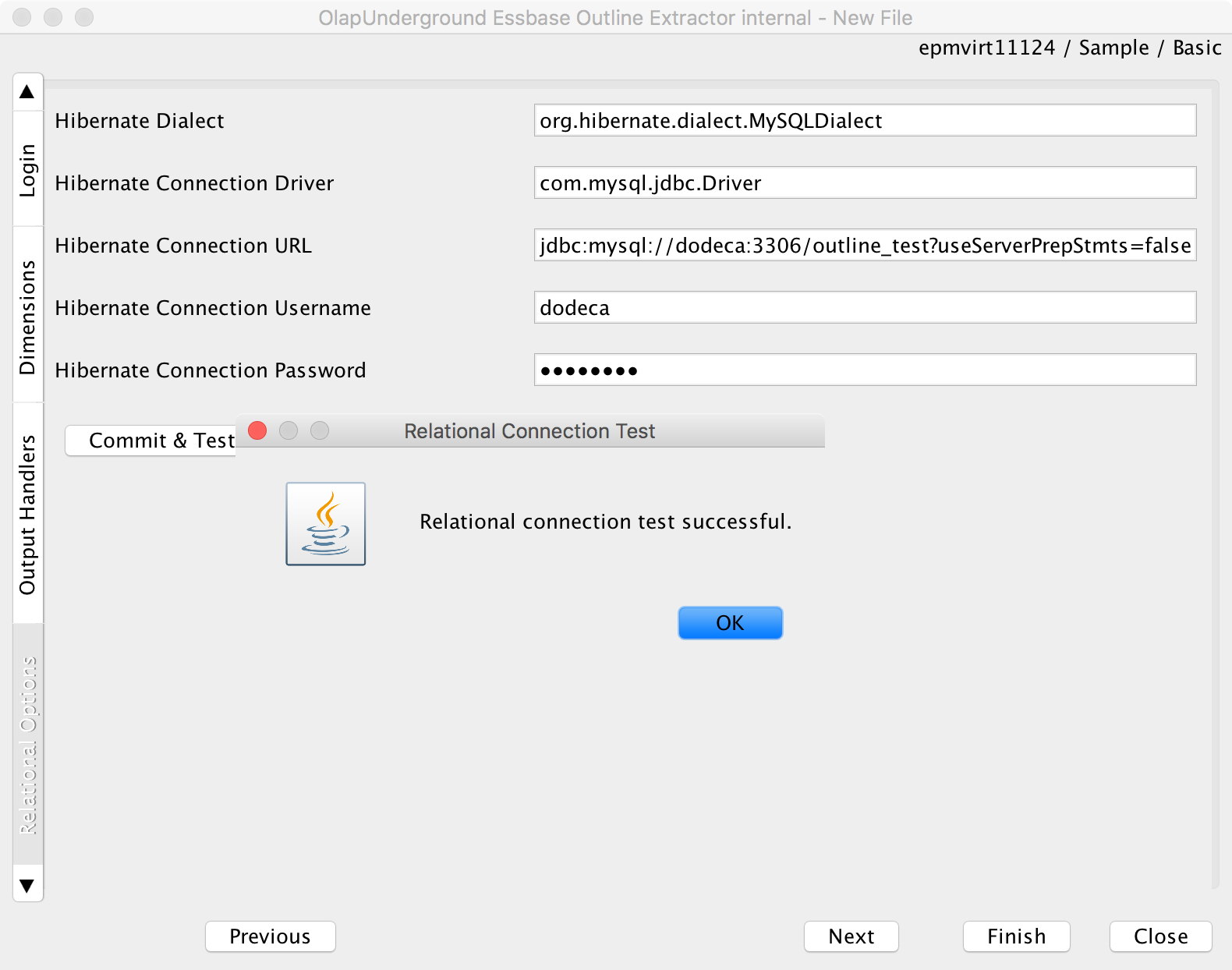
Now we need to define the relational configuration. You’ll notice that this is referred to as the “Hibernate” properties. Hibernate is a very widely used Java library that helps map from object oriented programming paradigms to a relational database. We need specify the dialect (there are different dialects for each database type, such as SQL Server, MySQL, Oracle, and others), the driver class, the JDBC URL, and the credentials. Note that each type of database has it’s own JDBC URL syntax and driver. If you need help with your database type, you can typically just google for JDBC plus your database type to get the proper settings.

Configure relational settings

Next we’ll want to press Commit & Test so we can verify we have the database connection information correct. This will actually create the tables on the target schema that will be used to store the member information. You can see here that the test was successful:

Results of a Commit & Test if successful

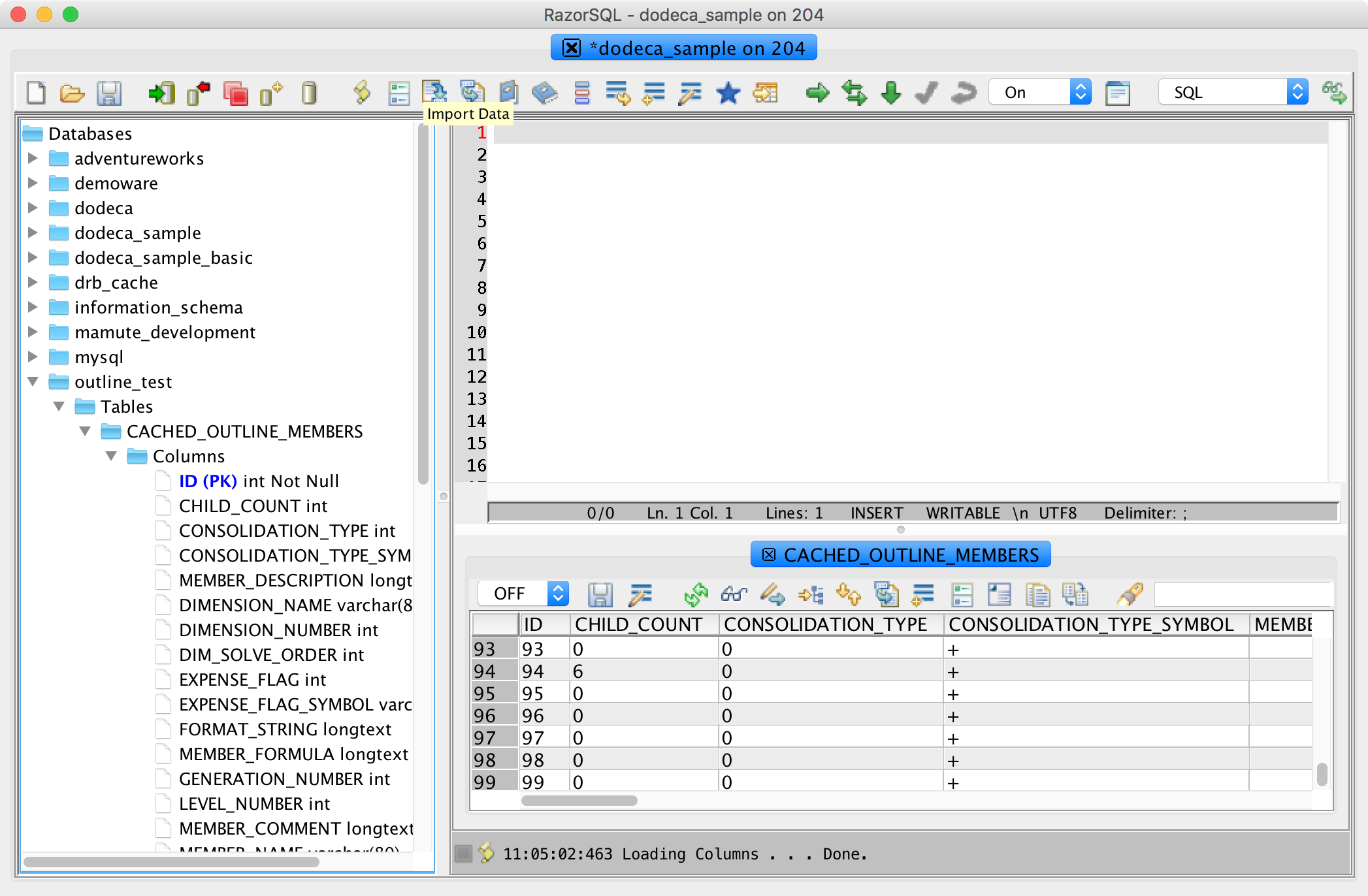
Switching over for a minute to my JDBC tool (RazorSQL), I can connect to my database server and see that indeed, the tables are created properly in the target schema:

Checking the tables in a JDBC tool

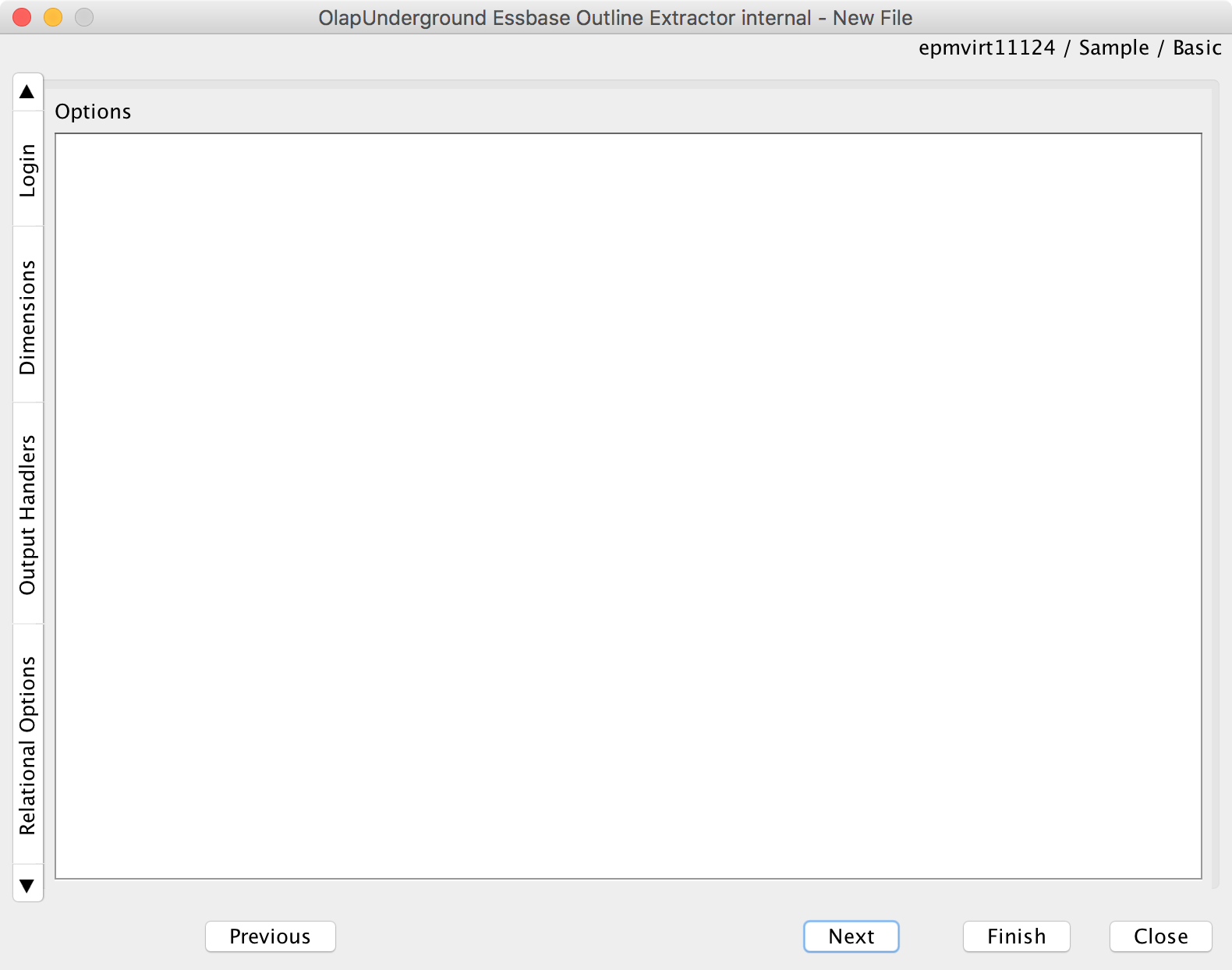
Back in the outline extractor, I can move forward to the options tab (there are no options for the relational extractor, so we can just skip ahead here):

No options to configure on this writer type

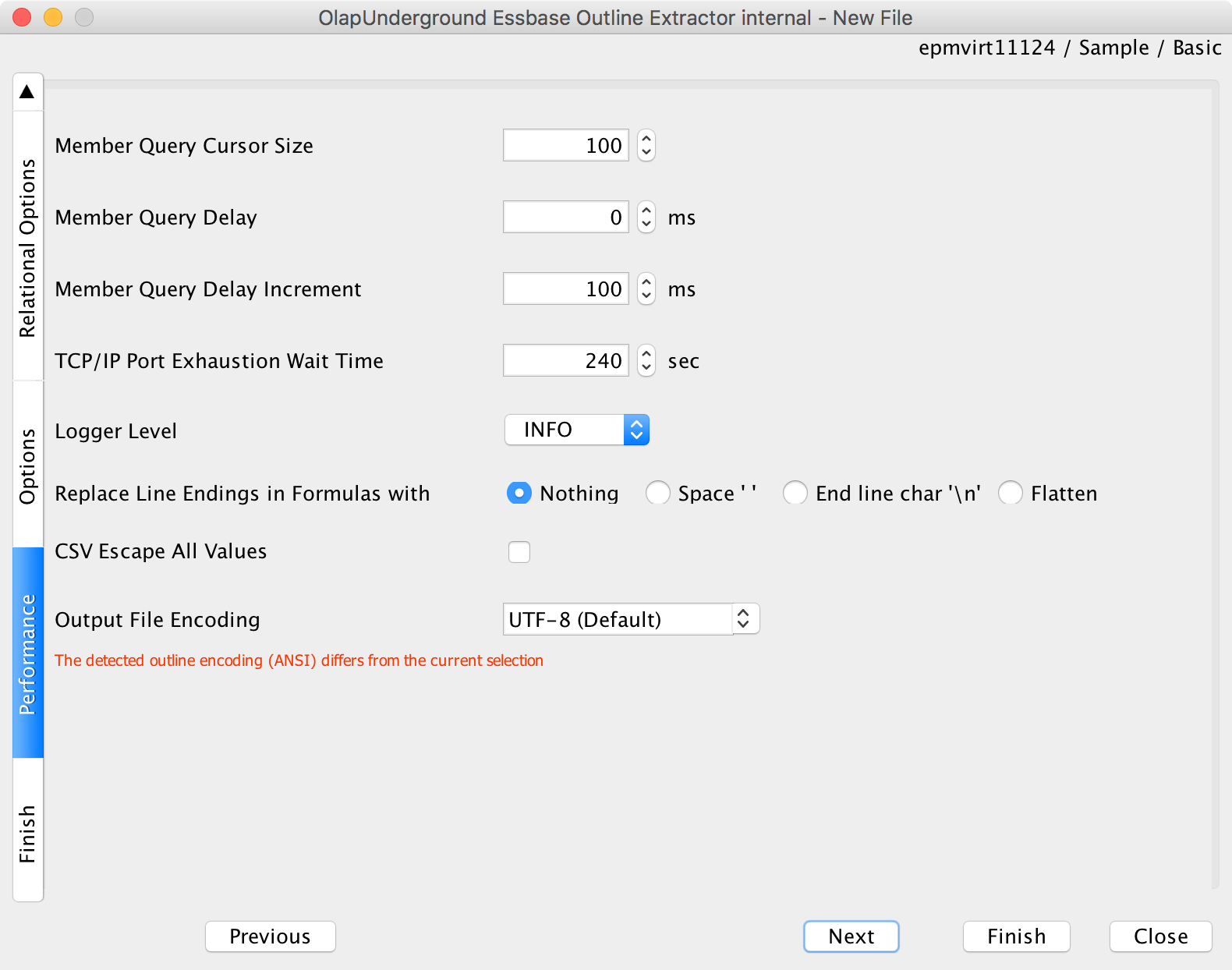
We can just accept all the defaults here on the Performance settings:

General extraction options (all default)

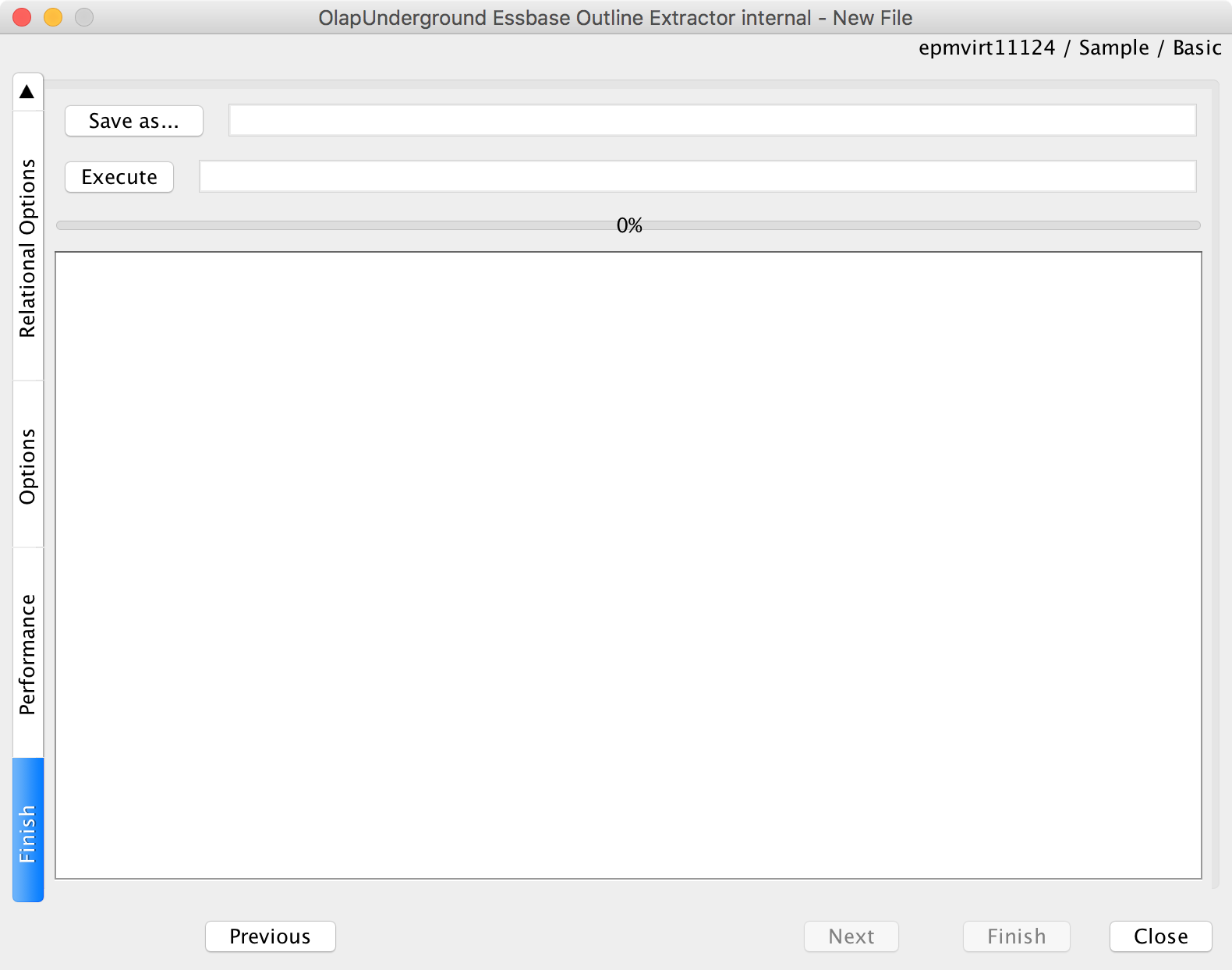
Now we’re on the pre-extraction screen. There are a couple of things to do here:

Pre-execution screen. Execute to run, Save as to save configuration

First, we can execute the extraction to perform it right now. After having performed the one-off extraction, I decide that I like it and I want to save the configuration so that I can use it again later. Therefore, I will click on the “Save as…” button and choose the name of a properties file to save to.

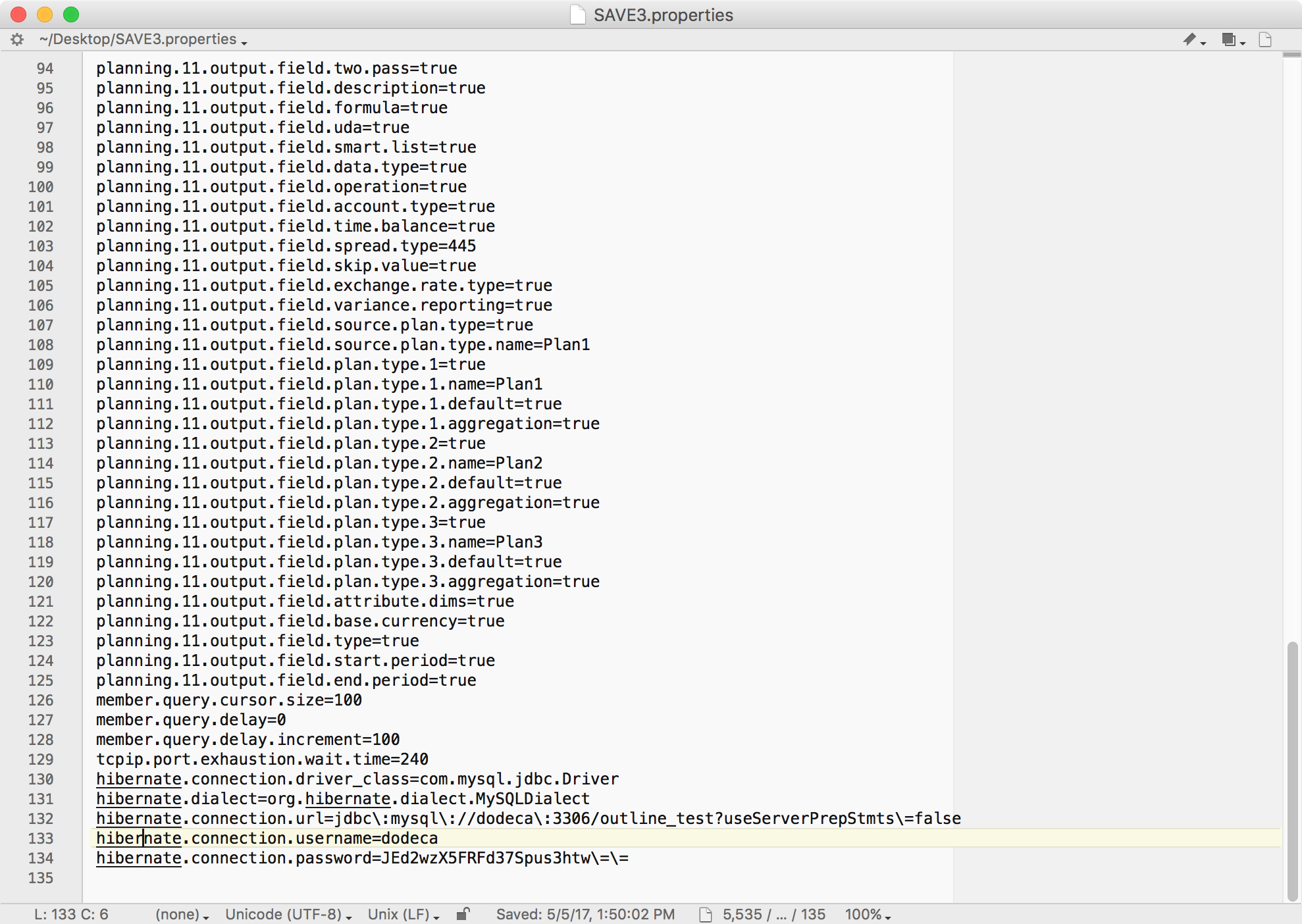
Let’s go check out what got saved into the properties file:

Contents of extraction configuration

You may notice at the end of this file, some Hibernate settings. This is the new part, as these settings weren’t in this file before, they were in a separate XML file that had to be managed. You can see that the extractor has placed in the driver type, dialect, and other connection information so that we can use it on a future extraction run. Also, the password is encrypted.

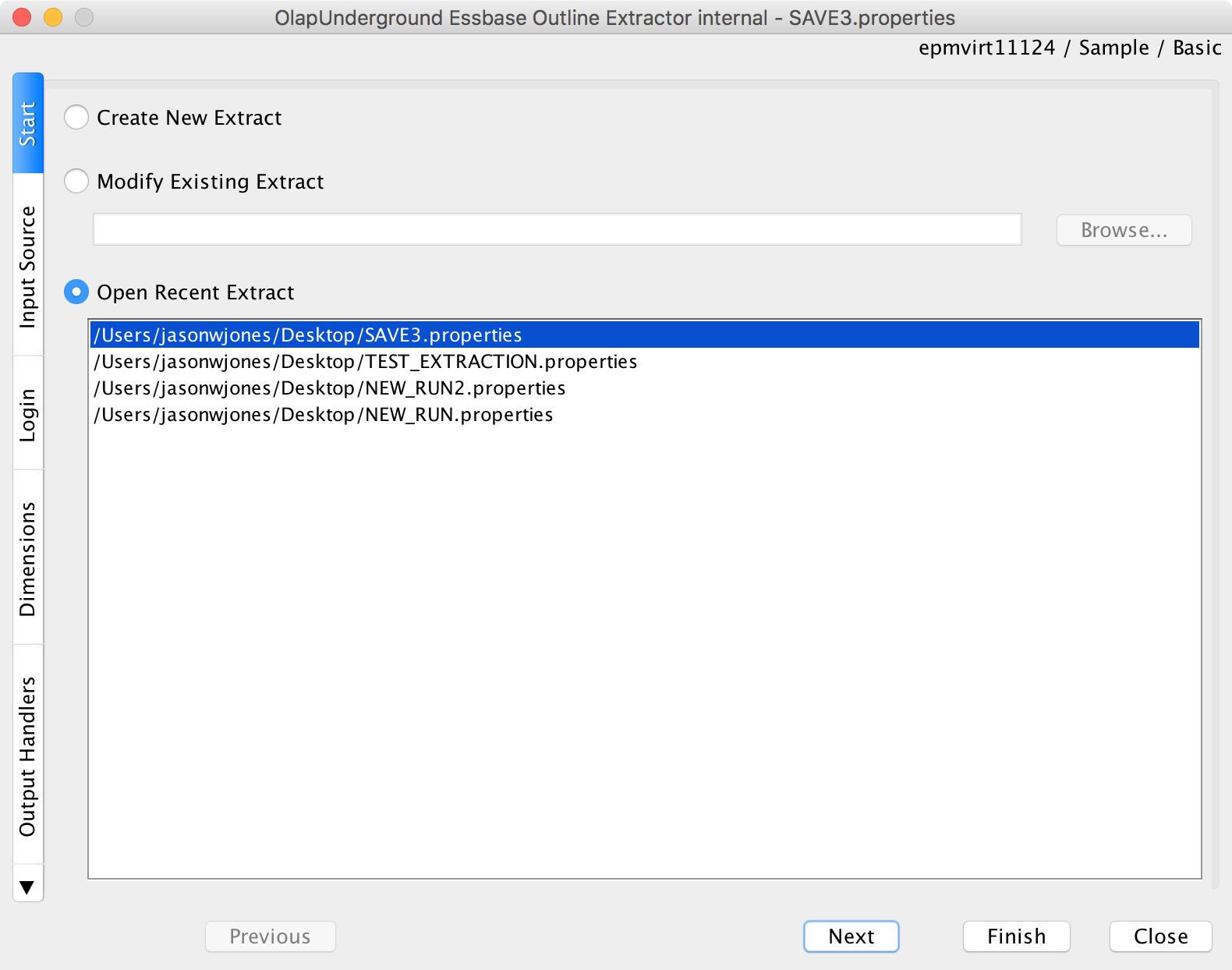
Now let’s run the extraction again and we’ll choose the properties file, indicating that we want to use the same exact settings from before (as specified in the file) to perform the extraction:

Running again, this time selecting an existing extraction configuration

Running through with the loaded properties file is exactly the same as before, just that all of the fields are pre-loaded for us. Perhaps more importantly, however, is that we can use the properties file to run the extractor on the command line. Let’s take a look at that.

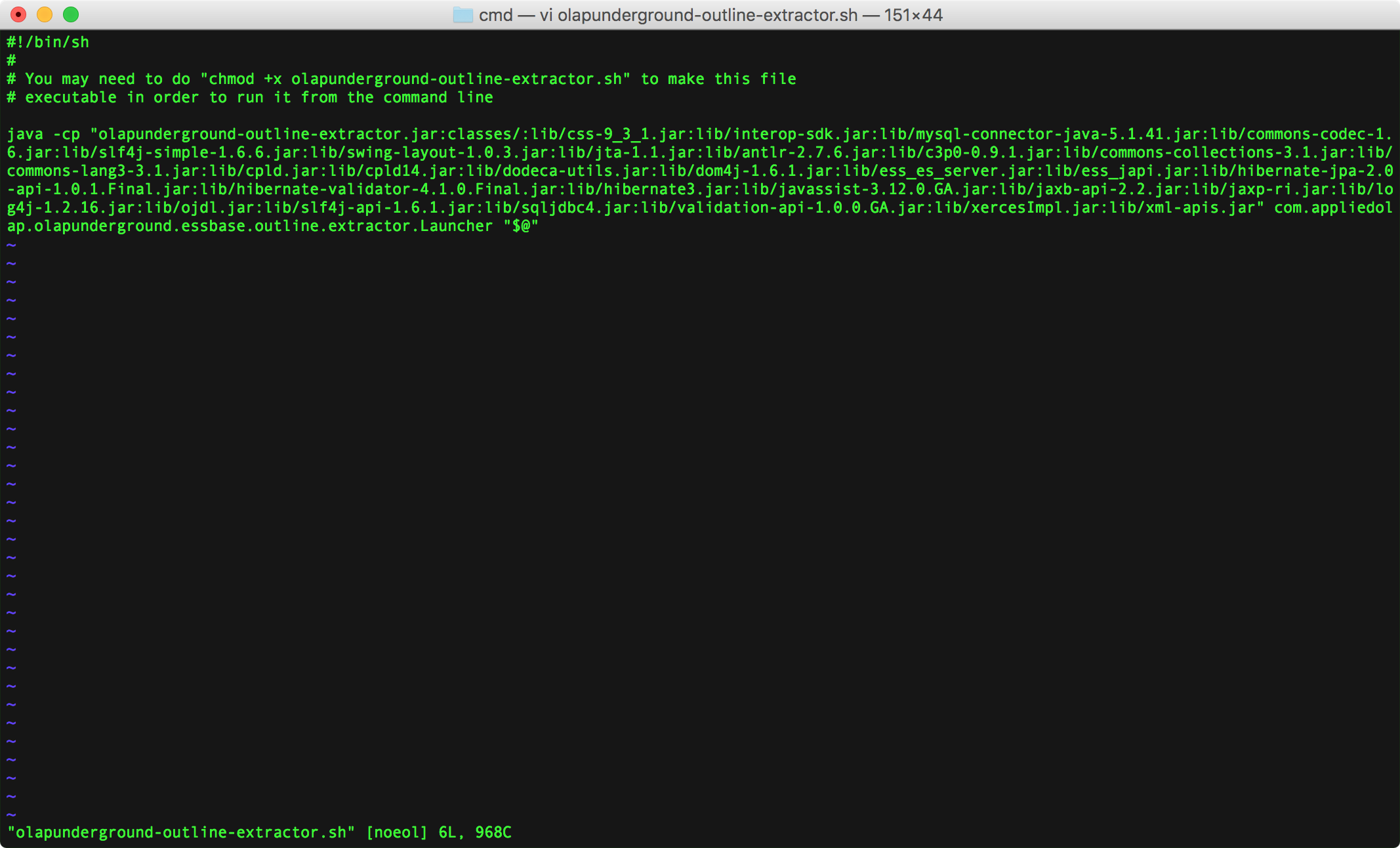
The extractor now ships with an additional shell script (olap-underground-outline-extractor.sh) that helps setup a command-line extraction for Unix systems. It previously included a file that worked on Windows, now it ships both. Here is a screenshot of that file:

Command line outline extraction helper for Unix systems

There’s not much going on here except that the extractor is run using the java command, and all arguments passed to this script are handed off to the extractor.

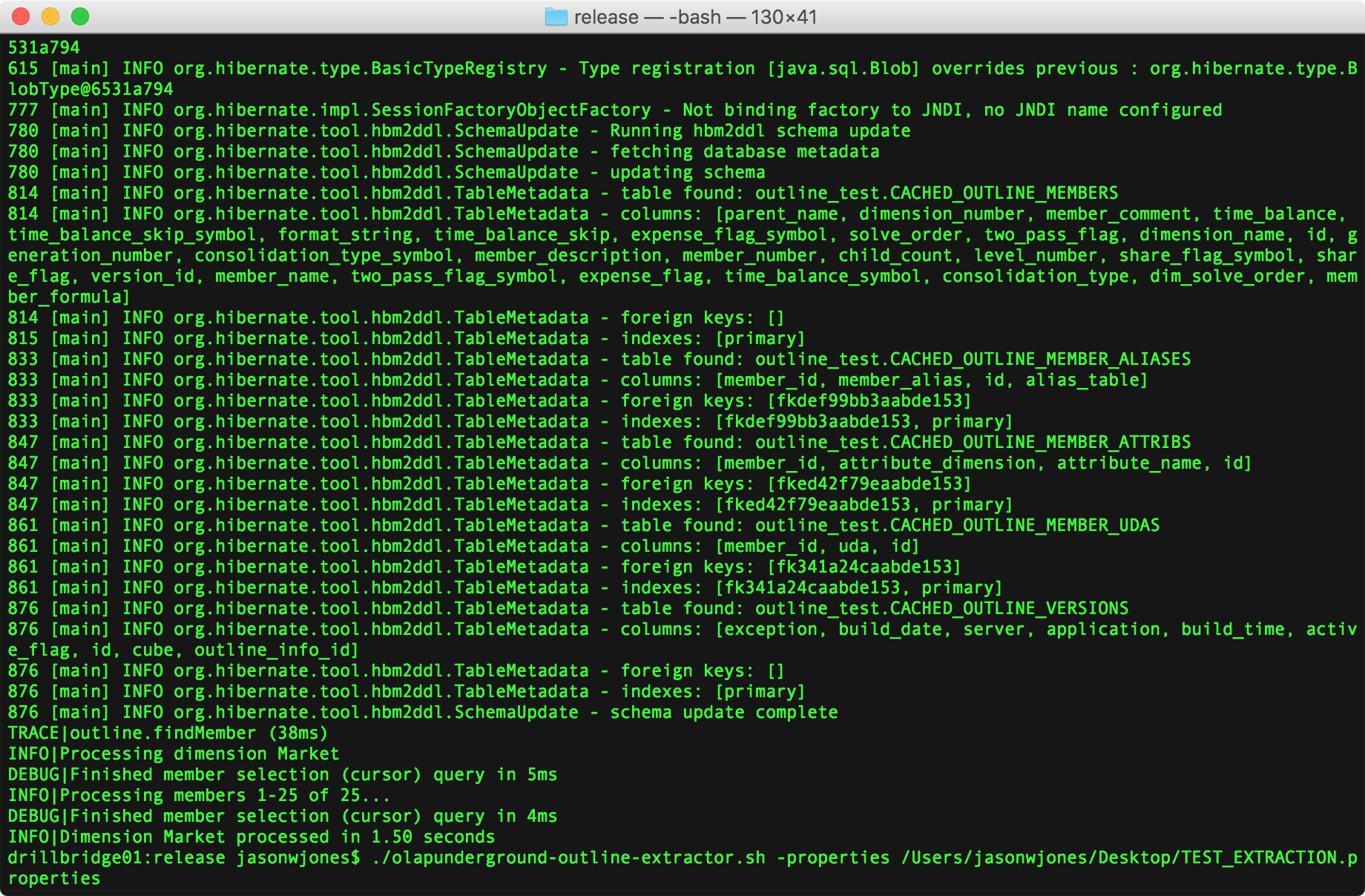
Let’s go ahead and run this script and specify the properties file from earlier:

Outline extractor command line results and example

You can see that I actually already ran the script but then for convenience just displayed the command-line I used at the bottom. The format to run with a properties file is ./olapunderground-outline-extractor.sh -properties name-of-props-file.properties.

If you care to read the output, you may notice that the extraction ran successfully, and as defined earlier, was able to use the specified strategy to extract the Market dimension and place its contents into the tables in the schema we created earlier.

Wrapping Up

The Next Generation Outline Extractor is a completely free utility that is supported, developed, and enhanced by the Applied OLAP team. It has been downloaded tens of thousands of times by many people in the EPM community.

I hope you enjoyed both this improvement to the outline extractor as well as this example of how to use this feature either for a one-off extraction, your automation, or both. The outline extractor continues to evolve and improve based on feedback from the community and users.

Release Note: This newest version of the Outline Extractor is not officially released at the moment. I’ll be released to the Applied OLAP website in the next day or two.


You Should Rethink Your Essbase/VBA Spreadsheets

Essbase is often described as getting its start in finance departments. It was finance’s secret weapon. There are a number of ways that Essbase tends to have evolved organically from this foothold. One common evolution is for the tool to gain critical importance to a company, and need to be more robustly managed by the IT department (in theory, anyway, I’ll save my thoughts on this common tragedy for another time).

One of the other common developments for Essbase in the finance department is that certain books/sheets evolve more and more functionality over time. They get augmented with automation, macros, VBA code modules, and more. This is all often on top of complicated formula references across sheets, and sometimes even across different books.

For example, a pretty common scenario for a company is that there is an Excel reporting book that is used for daily/week/monthly/yearly/whatever reporting. So you see this a lot:

  1. Open worksheet
  2. Change Time/Year members on sheet(s)
  3. Connect to Essbase
  4. Retrieve sheets to update
  5. Validate (you make sure it’s right, right?)

Over time there tend to be some extra one-off steps that are incorporated into this process, such as the need to:

  • Copy/paste cells
  • Incorporate data from additional sources/systems
  • Sort/filter data

What happens is that many enterprising analysts and organizations find ways to automate this process. They combine the Hyperion VBA module, a lot of glue code, and generally a significant amount of development. The end result is often pretty slick – on the surface: a semi-automated reporting system that streamlines a manual, error-prone, and time-consuming process.

With Great Spreadsheets Comes Great Risk

People are usually pretty excited at this point: the reporting process is quicker and easier. The value of Essbase has been enhanced. There is more time for other important activities. The code is still fresh in mind.

Over time, things change. Requirements change. The code changes. People and departments change. Quite often, the person that wrote the original and highly complex automation code moves on.

“Well, Chuck originally wrote this book, he was a real wizard with all of this stuff, but he quit a couple of years ago so we just kind of tweak it here and there but we don’t really know how it works. If this ever breaks, we are screwed.”

Others try mightily to wade through the byzantine code and put some duct tape on. Very often in this scenario, a company also makes a transition from the classic Excel add-in to Smart View. Many companies are forced to try and upgrade the solution (which in many cases was never an “official” solution to begin with), to the completely different Smart View API. Many of these solutions don’t ever get migrated – they get thrown away since it is just too much effort and risk to maintain or convert.

The Best Code Is No Code

I talk to a lot of people that are looking for a way to extend the life of their in-house VBA reporting/analysis solutions. And sure, you can use the Dodeca Excel Add-In VBA translation module as a drop-in solution to do just that. This can be a good stopgap solution. But it can be better.

What I so often tell people in this situation is to try not think “How do I replace this code?” – and instead think more holistically about the solution. These solutions also tend to have a huge amount of the verbose, repetitive, low-value, confusing and undocumented code that does things like:

  • Gather credentials
  • Connect to Essbase
  • Solicit member selections from the user
  • Retrieve one or more ranges on one or more sheets
  • Receive user input
  • Run a calculation

As it turns out, these are all tasks that Dodeca handles out of the box – with no code. You can simply define a named range on an Excel template and have Dodeca handle all of the details of connecting and retrieving. You avoid tons of complex logic trying to get member selections from the user (or relying on them to key them in manually, correctly) with Dodeca’s flexible selectors, data input is handled just as easily as retrieves, and custom calculations are simple to run – all just by configuring a few options on a Dodeca Essbase Excel view, and again, with no code.

Perhaps more importantly, since Dodeca centralizes the spreadsheet templates and reports, you don’t have to worry about distributing Excel books all over the place such as with email, and you don’t have to worry about syncing up changes and making updates.

I love laying down some code as much as the next person, but perhaps more than that, I like developing effective solutions that are high quality and give my users what they want. And Dodeca’s Essbase functionality and spreadsheet paradigm delivers over creaky VBA solutions any day of the week. To borrow an analogy – don’t try and build a faster horse: get a car.


PBJ 1.0.4 – New password options and start of CLI

The PBJ library has been getting a lot of attention lately from various developers using it to integrate with their own software and projects. Francisco Amores did a great blog post about using PBJ to help with data loading in an FDMEE project. Probably the coolest thing about his efforts is that it’s  use-case I never imagined: using PBJ in Jython to access PBCS.

One of the things that has been so great about collaborating with Francisco is getting targeted, useful, and practical comments on how he’s using the library and how it can be made better. And I have found time to make various improvements, enhancements, and fix bugs to address his feedback. This is one of the greatest things about open source software.

While Oracle provides some workable Java code in the PBCS REST API documentation, it’s akin to the old Java examples that ship/shipped with the Essbase Java API – they get the job done, but most people are going to copy and paste them, and end up reinventing the wheel in the process. Since day one, PBJ has striven to be a single, high-quality library that fits in well with enterprise Java (or Jython in the case of the FDMEE integration scenario), and is completely open-source with a license that is very well suited to giving businesses the flexibility they need.

Latest Improvements

Some bugs related to loading/importing data have been fixed. Additionally, new options are available for signing on to a PBCS instance. You can now create a connection object using a Base64 encoded password. Note that this isn’t meant to be an incredibly secure password storage mechanism. Mostly what it buys you is that if you have a raw script in something like FDMEE, you can avoid having a totally clear password. Of course, all communication with the REST API itself is over HTTPS, so you’re secure there as always.

One of the coolest improvements I was able to make lately to PBJ was to package the library as a single JAR file that makes it even easier to integrate into other projects. It turns out that PBJ uses some of the same Java libraries that FDMEE does and there was a conflict, but with Francisco’s feedback I was able to adjust things to avoid the conflict.

CLI Anyone?

There’s just one other really, really, cool (in my opinion) thing I started implementing in the PBJ library: a CLI. Now that PBJ is packaged as a single JAR file (if you want), it’s also a runnable JAR file (my preferred method of deploying Java applications that run on the command-line as it prevents a lot of hassle with classes, the class path, batch files, and other things). I’ve implemented a couple of really basic commands and can add more as time permits.

Here’s an example:


java -jar pbj-pbcs-client-1.0.4-SNAPSHOT.jar \
--conn-properties=/Users/jasonwjones/pbcs-client.properties \
--no-logging \
list-applications

This can be entered as a single line on the command line, but I have broken it up into multiple lines by using backslashes. If you’re not familiar, the backslash is used in many environments to “escape” the following character. Typically this is a newline or another backslash, but if it’s the last thing on the line, then it’s literally escaping the newline itself, meaning that an interpreter or the shell will treat multiple lines as a single line.

To avoid having to put the username/password/server on the command line, a simple properties file is used to provide that information. Then the command list-applications is given.

Here’s the output:


Vision
TestApp

Here’s the full output when run without any parameters, which explains the usage:


Usage: <main class> [options] [command] [command options]
  Options:
    --conn-properties, -C
       
    --debug-logging
       
       Default: false
    --no-logging
       
       Default: false
  Commands:
    list-applications      List available applications
      Usage: list-applications [options]

    encode-password      Encode a password for use in a connection
      Usage: encode-password [options]
        Options:
        * --plain-password
             

    get-member      Get information on a member in an application
      Usage: get-member [options]
        Options:
        * --application
             
        * --dimension
             
        * --member

But I can do that with EPMAutomate, right?

Absolutely. This shell isn’t meant to be a replacement for EPMAutomate, but in theory it can do everything that EPMAutomate can do. And more commands can be easily implemented. This is one of the beautiful things about Oracle having published a REST API that anyone can use. One of the potentials for this library that I can see is that since the project is completely open source, the community could easily add convenience methods or commands to work with PBCS. This could lead to the ability to cleanup on automation that uses batch/shell scripts and instead just add a couple of handy options to the CLI here. In fact, I even have an ad hoc grid library for PBCS that could be integrated with this client and expose some functionality that isn’t even in EPMAutomate.

As you can see, not too many options are implemented right now, just some proof of concept items with “get-member” and “list-applications“. But others can easily be added in. All of the new source code is available in the PBJ GitHub repository for anyone to clone, edit, use, or whatever. The GitHub repository has instruction son how to build but I think next week I’ll try and post a quick video showing how you can clone the code, build it locally, and use it in your own projects.

My Top 10 Favorite Drillbridge Features

Drillbridge is a tool with an ostensibly narrow focus – drill from Essbase/Hyperion data to somewhere else. Typically that “somewhere else” is the relational data that has been summarized to load into the cube. While the concept of drill-through is very simple in principle, Drillbridge has been extensively engineered to make take this simple process and augment it with dozens of features that enhance its usefulness.

That said, in no particular order, I thought it might be fun to point out my ten favorite Drillbridge features.

Get Around the 1,000 Item Limit in Oracle

Many traditional drill-through implementations run into an issue when drilling to more than 1,000 items. This generally happens when drilling from an upper-level member, such as high up in the Accounts of Entity dimension. Typically how this is implemented is that all of the level-0 descendants of the drilled member are placed into a SQL SELECT statement using the IN clause. For example, drilling on Qtr1 in an outline could yield a query like the following:


SELECT * FROM Transactions
WHERE MONTH_NAME IN ('Jan', 'Feb', 'Mar')

Most versions of the Oracle relational database, however, have a hard limit of 1,000 entries in the IN clause. Drillbridge provides an advanced syntax for getting around this by letting you specify how to break the items into multiple groups to get around the 1,000 item limit. For example, imagine that the limit was actually three items in a single IN clause and you had five items that you needed to check for:


SELECT * FROM Transactions
WHERE (MONTH_NAME IN ('Jan', 'Feb', 'Mar') OR
MONTH_NAME IN ('Apr', 'May'))

Paging

Drillbridge reports can be configured to break the results into several pages and allow the user to page through them. This can provide numerous benefits. The biggest benefit is to the user experience. Instead of waiting for 100,000 rows to load in, a particular report might be configured to break the results up into pages of 10,000 rows each. This can improve the user experience by making the browser more responsive (since there is less data in memory), and make it so the user can start viewing data before all of it has returned from the relational database. The user will be presented previous/next buttons in the interface to quickly navigate between pages:

Drillbridge paging feature

Drillable Columns

Drillable columns are one of the ways that Drillbridge allows for providing even more ability for the user to get context around their data. With drillable columns, any column or set of columns in a report can be configured to automatically link to another report. When the user clicks the link, Drillbridge will run the new report using the current POV combined with the POV of the row. For instance, if the user originally drilled into transactional detail and then wanted to drill on a particular transaction, the original POV (month, account, etc.) and the transaction number would be combined to launch the new report.

Drillable columns are also one of primary reasons why I like drilling into a web page instead of just plain/raw data in an Excel tab. Here’s an example with drillable columns:

Drillable columns in Drillbridge

If you look carefully you can see that the link at the bottom of the browser window actually includes all of the parameters from the POV and that particular row, enabling the target report to use the source parameter as it would any other parameter.

Drill to URL

The fundamental concept behind Drillbridge is that it flexibly creates a SQL query based on a given POV and it provides incredibly enhanced functionality for crafting that query. Drillbridge provides an additional report type out of the box that instead of generating a SQL query, generates a hyperlink, and contains all of the same functionality for mapping from the POV to a link that you’d expect in a normal report. For demonstration purposes, here’s an example query template:

Editing a Drillbridge URL forwarding report

Notice that instead of a query we are editing the “Link Template” and that it starts with http rather than the more traditional SELECT we are used to seeing. I’m able to do this because I set the type of the report to a Forwarding Link report instead of JDBC Drill-through Report (the default):

Changing the class of a report

Changing the report type also changes the available options that we have. The Forwarding Link report is a little simpler in terms of its options, but it lets us specify if we want the link to be submitted as a GET or a POST request:

Modifying options on the URL report type

Lastly, after testing this simple report where it submits a search request to Google, take a look at the URL that gets generated and shown in the browser:

Drillbridge URL report

You can see that the parameter I tested (“DrB_Test”) is up in the URL. Many organizations are using this functionality in order to drill into internal systems that show PDFs and images of invoices, receipts

Drill from Upper Level in PBCS

I think this is unique in the world right now, but Drillbridge drill-through from PBCS to on-premise (or cloud) relational databases and supports upper-level drill-through from PBCS. Again, by way of simple example, you can drill into member Qtr1 from PBCS and run a query on-prem that is something like SELECT * FROM Transactions WHERE MONTH_NUM IN ('01', '02', '03). Typically the children of Qtr1 would be Jan, Feb and Mar. This is really easy to convert to a month number using the built-in Drillbridge function #monthToDigits. This function is also really useful because it can handle full month names, different locales (month names in different languages). More importantly, though, is that Drillbridge uses the PBCS REST API to communicate with the cube in the cloud to figure out what those children are.

Essbase Upper Level Drill Ignore Non-Consolidating Option

This is probably a lesser known feature and a small one at that, but it’s a really great example of paying attention to the details. Occasionally you’ll have a hierarchy with some non-consolidating members, such as the following:


Total
    Account1 (+)
    Account2 (+)
    Memo Account (~)

In this case, Account1 and Account2 roll up to the total, but Memo Account does not. It still has data, however, that would be retrieved from running an upper-level drill from the Total member. This may be and often is what you want. However, sometimes it’s better or you really want to ensure that the total from the drilled member matches the total of entries in the drill-through request. So by setting the “~” custom flag on the token, you can tell Drillbridge that when it expands the upper-level member to the list of descendants to query, it should ignore any non-consolidating members. This will ensure that the total you drill on should match up with the sum of the entries. Again, a small feature but it is used out in the real world surprisingly often.

Excluded Members

Similar to the previous option/flag to ignore non-consolidating members, sometimes there are members in the outline that you do not want to drill on at all. Frequently this seems to be sensitive salary/HR data that is fine to show in the aggregate but you may not want people to be able to pull up detailed transactions and find out details. With excluded members, you can set a list of members that should always be removed from the SQL query, even if it would normally be part of the upper-level drill.

Custom Mappings

In a way, custom mappings are kind of the opposite of excluded members. They give you the chance to specify a list of arbitrary members in place of an existing member. This is most commonly used for YTD members on ASO cubes. For example, you might have a YTD_Feb member in the Time dimension as part of an alternate hierarchy. There are multiple ways to implement this but it’s common to do with a formula ([Jan] + [Feb] or something). Upper-level drill-through wouldn’t otherwise work here because their aren’t children of this member to provide to the SQL query. This is where custom mappings come in. We can specify via a simple text file or a SQL query that a list of members should be swapped in for a given member. So we can define a mapping such that Drillbridge treats YTD_Feb as if “Jan” and “Feb” were children of YTD_Feb, and perform the query accordingly. This allows for more flexibility in the outline and to provide uniform drill-through experience to the user (as opposed to making them go from the top of the house dimension or manually piece different queries together).

Editing Custom Mappings in Drillbridge

Custom Plugins

Drillbridge supports the ability to add new report types via custom plugins. The report types that Drillbridge ships with (JDBC/SQL, Forwarding Link, MDX, Composite, etc.) are just normal plugins (albeit ones that ship with Drillbridge). Custom plugins are the most interesting and powerful features of Drillbridge, although some custom coding is needed. Plugins are written in Java but have full control over the drill-through experience and output, while also being able to leverage the powerful query processing capabilities and framework built in to Drillbridge.

One of the more interesting uses of custom plugins I have seen in Drillbridge is where companies have an Essbase cube that is based on a GL, but the GL is constantly being updated. This can mean that if you’re drilling from the cube directly to the GL, you can have issues tying out because there may new newer entries throwing the totals off compared to what is in the cube. In this case, the company wanted to be able to see the additional detail though, but not confuse it with what was loaded to the cube. So they built a custom plugin that would color-code the data and put it at the bottom so that the normal data was shown first, then toward the bottom of the report, newer journal entries were shown in a dark grey color that denoted they were newer than what was in the cube. I thought this was a really great use of the custom plugins.

Themes!

The most recent version of Drillbridge Plus comes with the ability to design custom themes as well as a completely new theme called Prophecy. Ever since the earliest versions of Drillbridge it has been possible to modify the HTML/CSS used to render a page, but with the new theme capability, it’s possible to get a different look on your reports with just a single option change. Users of the new Prophecy theme will feel right at home with their other Oracle tools. Here’s a sample image from a normal report with the new theme turned on:

Drillbridge report with Prophecy theme selected

That’s All For Now

I think drill-through has never been more important or useful to users of Essbase/Hyperion products, as it provides very useful and rich context for the OLAP systems organizations spend so much time using. Ever since day one, Drillbridge has tried to do one very specific thing but do it very, very well. I hope you enjoyed this overview of some of my favorite Drillbridge features and welcome your questions and comments!

PBJ (PBCS REST API Library for Java) Updates

I have recently gotten quite a bit of feedback from people using the PBJ library to consume and work with the PBCS REST API. This has resulted in a few fixes and improvements. First of all, file uploads and downloads are now working. The code has been in for awhile but wasn’t merged to the master branch.

Second, I have been working with the very talented Francisco Amores to help integrate the PBJ library with FDMEE so that it can be used there in various integration scenarios. So this is a really cool usage of PBJ where the library is being dropped in to FDMEE/ODI and utilized with a very simple Jython script.

To help with this scenario, I added a new compile option to PBJ that allows it to be packaged up into a single “uber JAR” – meaning a Java JAR file that contains all of its dependencies rolled into a single library. This makes it a little easier to integrate and drop-in to other systems, instead of having to worry out additional JAR files.

We had to make a couple of other tweaks to the way the library is packaged in order to make it specifically work in FDMEE/ODI, due to a conflicting underlying library. This is kind of a classic Java class loader problem, because what happens is that the two different versions of the class are both available to be loaded, and the older version of the class gets loaded but that class doesn’t have a required method, so a “no such method found” exception is thrown. But by renaming the package/method when it’s compiled, we can get around it and make it really simple. The PBJ GitHub page has some more info on how to compile this.

I think in the near future Fransisco will be blogging out this really interesting integration scenario, so stay tuned!

Dodeca Workbook Script documentation available online

I kind of posted this on the down-low earlier this week but got outed by my auto-tweet feature, where it got picked up by Oracle EPM Blogs and a few others, so I thought I should just write about this for real.

Earlier this week, the new documentation for the Dodeca Workbook Script functionality went online. In case you’re not familiar, Workbook Scripts are part of Dodeca Spreadsheet Management System’s event-driven extensibility model. You can kind of think of it as an elegant blend of the best aspects of Microsoft Access macros and Visual Basic, but designed from day 1 to make it easy to facilitate really sophisticated functionality in views that contain Essbase, SQL, or MDX data (or all three on the same sheet!)

The documentation contains a full index, all methods/overloads, events, and functions. It represents one of the first major steps towards my goal of making incredibly high quality documentation and online resources available for people that are developing with Dodeca. In the future I am hoping to get even more documentation online with samples and other resources that make developing even better.

I’ll be at Collaborate 2017 in Las Vegas, say hello!

Lots of exciting things going on right now – I’ll be in Las Vegas next week for the Collaborate 2017 conference. Originally I was just giving one presentation, but now I have three (yay!). I am going to be presenting on the PBCS REST API and in particular how to use it via the high-quality, open source PBCS REST API Java client, PBJ. I am also going too be presenting on “Essbase Tools & Toys” – a whirlwind overview of some of the free tools that make Essbase better that I have created over the years (including Drillbridge, Cubedata, Vess, Camshaft, Thriller, and more), and on the Dodeca Spreadsheet Management System.

Additionally, Applied OLAP will have a booth in the Hyperion section of the exhibit hall, which is where I’ll ostensibly be when I’m not doing presentations. Please swing by and say hello!