Vess
Vess is a JDBC driver that turns a whole Essbase server into a database you can browse and query with SQL. Applications are catalogs and cubes are schemas. Each dimension is a table, the cube’s data is a fact table, substitution variables and scripts are tables you can edit, and calc scripts are stored procedures.
Essbase is easy to ask about one thing at a time and awkward to ask about everything at once: which members have a UDA, what every variable is set to, how this quarter’s numbers compare by an attribute. The usual answers are MaxL output to scrape, an outline extract to load somewhere, or MDX written for the occasion. With Vess, the server is something any SQL tool already understands, and the answers are queries.
It’s open source under the Apache 2.0 license, and on GitHub. It talks to Essbase over the REST API, so it needs no Oracle software.
What You Can Do With It
Explore a server in your IDE
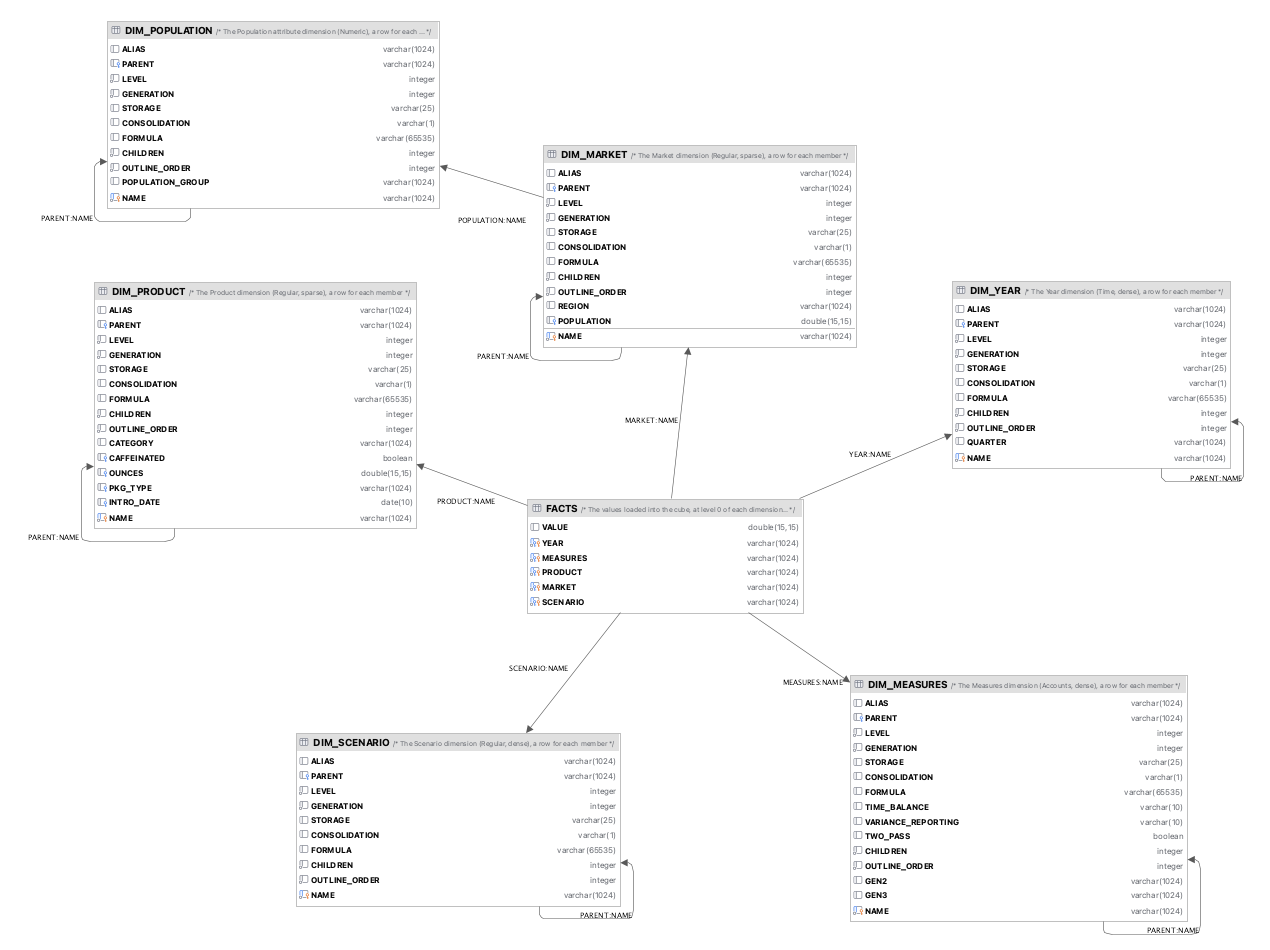
Add Vess to IntelliJ, DataGrip, DBeaver or any other tool that takes a JDBC driver, and the tree shows every application and cube. Each cube has its data, a table for each dimension, its variables, scripts, sessions and locks, and its calc scripts as routines. The tables have keys, so a diagram of a cube comes out as the star schema it is: the cube’s data in the middle, a line to each dimension’s table, and on from there to the attribute dimensions that describe it.
Read a dimension as a table
A dimension’s table has a row for each member, with columns for its generations, holding each
member’s ancestor there (CATEGORY here), and a column for each attribute, with its proper type:
SELECT NAME, ALIAS, CATEGORY, CAFFEINATED, OUNCES, PKG_TYPE, INTRO_DATE
FROM Sample.Basic.DIM_PRODUCT
WHERE LEVEL = 0
ORDER BY OUTLINE_ORDER

+--------+--------------------+----------+-------------+--------+----------+------------+
| NAME   | ALIAS              | CATEGORY | CAFFEINATED | OUNCES | PKG_TYPE | INTRO_DATE |
+--------+--------------------+----------+-------------+--------+----------+------------+
| 100-10 | Cola               | 100      | true        | 12.0   | Can      | 1996-03-25 |
| 100-20 | Diet Cola          | 100      | true        | 12.0   | Can      | 1996-04-01 |
| 100-30 | Caffeine Free Cola | 100      | false       | 16.0   | Bottle   | 1996-04-01 |
| 200-10 | Old Fashioned      | 200      | true        | 12.0   | Bottle   | 1995-09-27 |
...
Ask the cube a question
CELLS has every value in the cube, at every level, so it answers with Essbase’s own totals and
calculations. Vess turns the conditions into the MDX that reads just what’s asked for:
SELECT SCENARIO, VALUE
FROM Sample.Basic.CELLS
WHERE YEAR = 'Qtr1' AND MEASURES = 'Sales' AND PRODUCT = '100' AND MARKET = 'East'

+------------+-------------------+
| SCENARIO   | VALUE             |
+------------+-------------------+
| Scenario   | 6292.0            |
| Actual     | 6292.0            |
| Budget     | 5870.0            |
| Variance   | 422.0             |
| Variance % | 7.189097103918228 |
+------------+-------------------+
Analyze it like a fact table
FACTS has the values loaded at level 0, which add up the way SQL expects, so they can be joined
to the dimension tables and grouped by anything there, attributes included:
SELECT p.CATEGORY, p.CAFFEINATED, SUM(f.VALUE) AS SALES
FROM Sample.Basic.FACTS f
JOIN Sample.Basic.DIM_PRODUCT p ON f.PRODUCT = p.NAME
WHERE f.MEASURES = 'Sales' AND f.SCENARIO = 'Actual'
GROUP BY p.CATEGORY, p.CAFFEINATED
ORDER BY p.CATEGORY, p.CAFFEINATED

+----------+-------------+----------+
| CATEGORY | CAFFEINATED | SALES    |
+----------+-------------+----------+
| 100      | false       | 12841.0  |
| 100      | true        | 93293.0  |
| 200      | false       | 29309.0  |
| 200      | true        | 79777.0  |
| 300      | true        | 101405.0 |
| 400      | false       | 84230.0  |
+----------+-------------+----------+
Use the outline in SQL
Functions such as IS_DESCENDANT, IS_CHILD and HAS_UDA answer from the outline, shared members
included, and narrow what’s read before any MDX runs:
SELECT PRODUCT, MEMBER_ALIAS(PRODUCT) AS ALIAS, SUM(VALUE) AS SALES
FROM Sample.Basic.FACTS
WHERE IS_DESCENDANT(PRODUCT, 'Diet') AND HAS_UDA(MARKET, 'Major Market')
  AND MEASURES = 'Sales' AND SCENARIO = 'Actual'
GROUP BY PRODUCT
ORDER BY PRODUCT

+---------+----------------+---------+
| PRODUCT | ALIAS          | SALES   |
+---------+----------------+---------+
| 100-20  | Diet Cola      | 14902.0 |
| 200-20  | Diet Root Beer | 21078.0 |
| 300-30  | Diet Cream     | 13313.0 |
+---------+----------------+---------+
Change things with SQL
Variables, scripts and the data itself change with plain statements, which a tool’s table editor writes for you:
UPDATE Sample.Basic.VARIABLES SET VALUE = 'Feb' WHERE NAME = 'CurMonth';
UPDATE Sample.Basic.FACTS SET VALUE = VALUE * 1.05 WHERE SCENARIO = 'Budget' AND YEAR = 'Jan';
CALL Sample.Basic.CalcAll();
A read-only connection refuses all of that, so browsing is safe.
Vess, Thriller and Camshaft
They’re three ways in to the same server. Thriller is the driver for running MDX from tools that speak JDBC, and Camshaft runs MDX from the command line. Vess is the one for SQL, and it runs MDX too, by handing it to Thriller, so one connection does both.
Getting It
Version 1.0.0 is on the releases page
as a single jar for Java 17 or newer, and on Maven Central as
com.jasonwjones.hyperion.vess:vess-essbase-jdbc. The
README has the rest: connecting, setting
it up in IntelliJ and DBeaver, every table and setting, and what Vess does underneath. The
cookbook has more
queries, each with the rows it answers with.
History
Vess started in 2015 as an experiment: a virtual Essbase JDBC driver
built on the H2 database engine and the Essbase Java API. It could
update substitution variables, show
database statistics and outlines, load data with an
INSERT, and plug into Dodeca and
ODI like any other database. It never had a public
release: it needed Oracle’s jars, and reading cube data was still a work in progress when it was set
aside.
Version 1.0, in 2026, is a rewrite over the REST API, with Apache Calcite as its SQL engine, and
reading the data is what it does best. The original code is still in the repository, tagged
vess-1.x.