
jason w. jones

software from the trenches

Drillbridge 1.3.3 hot off the press

Well, here we are again. Birds are singing, the sun is shining, bytes are compiling… and a new Drillbridge point release is out the door. Don’t let the small version bump (from 1.3.2) fool you. This version has seen some significant engineering in the area of performance.

All versions of Drillbridge up to this point (anything 1.3.2 or less) have used a straightforward strategy for getting rows of data into a webpage for the user. In particular, this strategy worked kinda of like this:

Drillbridge: “Hey Mr. Database, can I have these rows that my user wants?”

Database: “Why sure Mr. Drillbridge! Here’s a metric crap ton of rows for you!”

Drillbridge: “Golly, thanks for all the rows of data Mr. Database! I’m going to process through ALL of those and create a formatted version of all of those rows, and then I’m going to hand those off to an HTML template that needs to iterate over all of them and insert them one at a time into the DOM and then pray that the node insertion routine has good performance and…”

Database: “Look kid, you go and play, this bottle of tequila isn’t going to drink itself.”

So, anyway, single page report results have been reworked with performance in mind. In particular, results are processed AS they stream in from the database and are formatted on the fly, then outputted right to the web browser. No more handing off giant table of data (in cases where there were lots of results). Generally speaking, I am seeing page render times that are just slightly above the time it takes to pull the results from the database in the first place.

Drillbridge didn’t really have any problems with smallish result sets but now it pretty easily handles tens of thousands and more.

Additionally, this version of Drillbridge introduces an optional DataTables formatting option as well as server-side paged results. Do read the documentation for implementing results that are paged on the server as there are a couple of steps to set it up. I would consider this feature to be early, but useable. Please let me know if you bump into any issues.

As with before, subsequent releases of Drillbridge will focus on polish, bugfixing, and stability. Future releases will likely slow down as the product matures.

Drillbridge can be found as always in the Saxifrage Systems LLC downloads section. Don’t forget about the support forums, the shiny new Drillbridge wiki, and my upcoming ODTUG Drillbridge webinar on October 28th. It’s more than likely that Drillbridge 1.3.3 will be the version I use for the webinar!

I have tested this version as well as I reasonably can but if you encounter show stopping issues with the database upgrade or usage please let me know and I’ll address that in a quick followup release. So until further notice consider this beta-ish quality.

Happy drilling!
Performance nuances with MaxL data imports with local and server

Some time ago, I reviewed and revamped the MaxL automation for a client. One of the major performance gains I got was actually pretty simple to implement but resulted in a huge performance improvement.

Did you know that the MaxL import data command can can be told whether the file to load is a local data file or a server data file? Check out the MaxL reference here for a quick refresher. See that bold “local” after from? That’s the default, meaning if we omit the keyword altogether, then the MaxL interpreter just assumes it’s a local file.

Imagine that you have an Essbase server, and then a separate machine with the MaxL interpreter. This could be your local workstation or a dedicated automation server. Let’s say that there is a text file on your workstation at C:/Essbase/data.txt. You would craft a MaxL import command to import the local data file named C:/Essbase/data.txt. That’s because the file is local to the MaxL interpreter.

Now imagine that the file we want to load is actually on the server itself and we have a drive mapped (such as the Y: drive) from our workstation to the server. We can still import the data file as a local file, but this time it’s Y:/data.txt (Assume that the drive is mapped directly to the folder containing the file).

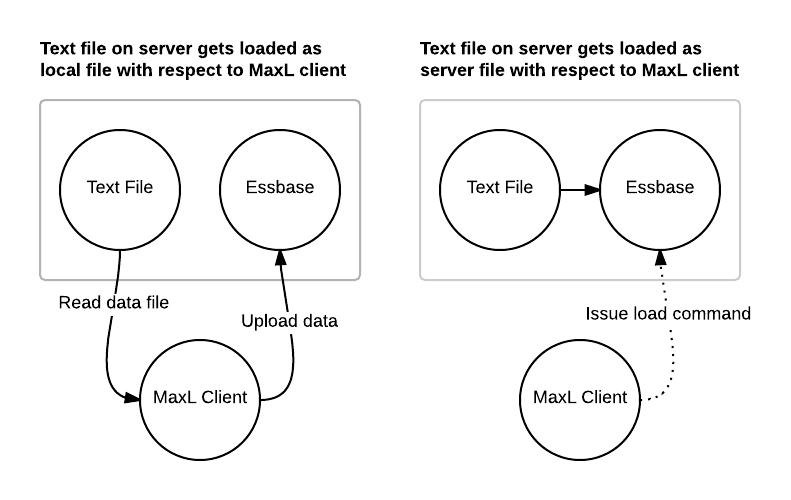
In this scenario, MaxL reads the file over the network from the server to the client, then uploads that data back to the server. This data flow is represented in the figure in the left of this diagram:

MaxL data loads: server vs. local

You might be thinking, “But wait, the file is on the server, shouldn’t it be faster?” Well, no. But there’s hope. Now consider server file loading. In this case we use the server keyword on the import statement and we specify the name of the file to load. Note that the file location is based on the database being loaded to. If you’re loading to Sample Basic, then Essbase will look in the ../app/Sample/Basic folder for the file. If you don’t want to put files in the database folder, you can actually cheat a little bit and specify a path such as ..\..\data.txt and load the file from a relative path. In this case by specifying the ..\..\, Essbase will go up two folders (to the \app folder) and look for the file there. You can fudge the paths a little, but the key is this: Essbase will load the file from itself, without the MaxL client incurring the performance penalty of two full trips of the data. This is depicted in the right figure in the diagram: the MaxL client issues a data load command to the server, which then loads the file directly, and we don’t incur the time needed to load the file.

In my case the automation the written to load a file that was already on the server (in the \app folder), so I just changed the import to be a server style import, and immediately cut the data import time dramatically.

I wouldn’t be surprised if this “anti-pattern” is being used in other places – so take a look at your automation. Let me know if you find this in your environment and are able to get a performance boost!


Drillbridge Wiki now up

It has been quite a busy week owing to helping a client deal with some major production issues. The fires are put out for the moment so I am finding myself with a minute or two to move forward a wee bit on Drillbridge.

Several of you indicated a willingness or desire to help out with a wiki for Drillbridge content, so that’s exactly what I have done. The Drillbridge Wiki is now live. For now I have imported the content from the Drillbridge manual to start things off. It looks pretty nice. I haven’t done much to modify or validate the formatting but things look okay. I might say that right now there are a handful of big pages rather than a lot of moderately sized pages, but I am sure over time it will morph into something more Wiki-like.

You can create an account in order to make edits. Please have it if you are interested. Feel free to post tips, tricks, examples, clarifications, links to blog articles written about Drillbridge, and more. You won’t hurt my feelings if you decide to move things around or edit them. Moving forward the wiki will be the primary form of documentation rather than trying to keep the PDF manual in sync with it.

In other Drillbridge news, I haven’t had a lot of time to work on it, but I am still working on 1.3.3. It contains some fixes and some pretty awesome performance improvements. Just sit tight and wait for the awesomeness to get completed.

Essbase Java API Consulting & Custom Development Available

I recently finished developing a solution for a client that involved writing a custom Java program using the Essbase API. The client was really amazed at how quickly I was able to develop the solution because their previous experience with using it (or hiring someone to develop with it for them) was not nearly as productive or smooth.

I graciously accepted their compliment and then told them that I’ve simply been working with the Essbase Java API for a long time – almost a decade now. Not only that, but I have several helper libraries that I use in most of my projects that prevent me from having to reinvent the wheel. By this time the libraries are quite battle-tested and robust and help speed up the development of many common operations such as pulling information out of the outline, running MDX queries, programmatically doing a data load, pulling statistical information, and more. Instead of spinning my wheels writing and rewriting the same boilerplate code, I accelerate development and focus on creating a good solution for the task at hand.

That all being said, for those of you out there finding this blog post now or in the future, whether you’re an administrator, consultant, manager, or other, and find yourself needing some help with a solution that involves Java development and utilizing the Essbase Java API, don’t hesitate to contact me. I am available through my consulting firm to do custom work or even fixing existing solutions you have already that are now exhibiting some quirk or need an enhancement. My extensive experience with Java and this particular API means than I can get up and running fixing your problem, not learning how to do it while on the clock.

Drillbridge 1.3.2 available

Well, it’s been a busy couple of weeks. I scaled back the plan for 1.3.2 a little bit and just polished up the things that were done. This release has some interesting but modest updates. Here’s the exact feature list from the release notes:

  • New function: rightMinusStarting
  • New function: leftMinusEnding
  • New function: monthToTwoDigits
  • Tables are now enhanced with Data Tables for formatting and other awesome functionality
  • Paging is back!
  • Interior of HTML table is very performance sensitive — might need to now generated inline

Left/Right starting/ending functions

So, a few things are going on here. There are a couple of new convenience functions. What do you do if you need the right 8 characters of a 10 character string, for example? Usually you need to take the length of the whole string, subtract out the length of the prefix, blah blah blah, it’s annoying. The new leftMinusEnding function is a convenience function that gives you the left characters in the string MINUS the ending N characters. And similarly for the rightMinusStarting function. This will be a simpler way to deal with stripping a prefix off that’s a certain length. So let’s say the member name in your outline is Loc_1000 and you just need the “1000” for your query. You could do #rightMinusStarting(#Location, 4) to get just ‘1000’. And if the string was 1000_Loc then you could do #leftMinusEnding(#Location, 4) to get ‘1000’. Simple but useful.

#monthToTwoDigits function

Wait a second, don’t we already have this? Sorta. This new function with a shorter name is locale aware. This should come in handy for people in German, French, and any other locales to be able to translate month names in your language to a digit. Also, this function combines translates for both short month names and long month names. So let’s say the outline contains “März” (German for the month of March). We can now use the new function like this:

#monthToTwoDigits(#Time, 'de')

In this case I’m assuming that #Time is your time dimension with month names in it. “de” is the locale code for German (Deutsch), so this function will return a value of ’03’. Not that this function as with all others returns a string value, but you can use it numerically.

DataTables

The “DataTables” library is now used to make the formatting of the table even nicer.

Paging is back!

The paging functionality is leveraged from the DataTables functionality in order to provide paging. Note that paging is NOT multiple requests to the database to get the rows needed – Drillbridge always executes a query that returns all rows and the paging that occurs is entirely within what the web browser shows. Paging is a per-report option that can be on or off.

Better performance with tons of rows

The code that generates the table itself has been rewritten. I did a lot more testing with larger datasets and couldn’t believe how much it could bog down with lots of rows. I did some testing with a 600,000 row result set and in my case the data itself takes 29 seconds to pull from the database server. Before, the table would take ages to show up, if at all. Now it renders in a second. There are a few performance issues that you run into in the web browser with this much data, but that just is what it is.

Towards 1.3.3

Like I said, this release has a little less than what I wanted – I still have some cool things in store for subsequent releases, but philosophically I would like to release early and release often. So instead of doing so much work that it takes an extra month or two and then is a bigger change/version, I’d like to do incremental releases. For those of you providing feedback on the forums and email, thank you again so much. I am still tracking every single suggestion that has been made and still plan to address those items when time permits. In the coming weeks I’ll get the development plans/roadmap out and more public so you can see what’s in store, but for now just keep that feedback coming and let me know if you hit any snags.

As always, Drillbridge is available in the downloads section.

End of the road for EIS, start of the road for Drillbridge

Essbase Integration Services (more commonly referred to as EIS) has been officially end of lifed. I have always been a huge EIS fan since I first learned about it, and can’t help but feel a little nostalgic about my early days with it. It was even the basis of a number of my early blog articles going all the way back to 2009 or so, and to this day those articles remain some of my most popular, if only because there are precious few articles on EIS out there.

Most of you readers are probably familiar with EIS and its position in the greater Essbase landscape, but for those who aren’t familiar, here’s a rundown: EIS is can create and update Essbase outlines and data using data stored in a relational database. Don’t be fooled into thinking this is just an Essbase load rule that is pointed to a SQL table. EIS is a veritable Swiss army knife in terms of building outlines, with much flexibility with generating the levels, parent/child builds, setting member properties (formulas, UDAs, consolidation operator), and then loading the data.

EIS really shines when you have a well-designed database schema to use as your basis: primary keys, foreign keys, proper data modeling, and so forth. This might seem pretty obvious but the fact of the matter is that many of the environments I have seen using EIS have implemented it with a poorly constructed data source. EIS still works in this scenario, of course, but sometimes it’s just not as great.

You may already know that Essbase Studio is the successor (perhaps more spiritually than technically) to EIS, in that it provides the ability to create cubes/outlines and load data from relational tables. Essbase Studio improves upon EIS in many ways, but also significantly changes things around. I am an expert with EIS but by no means an expert with Essbase Studio (just to provide a somewhat narcissistic reference point for how much of your EIS knowledge might transfer over to Studio).

One of the big things that EIS and Studio bring to the table is the ability to implement drill-through. So perhaps you’re loading some transactional data that has been consolidated somehow, implementing drill-through with EIS/Studio enables you to provide the ability for users to see a number in the cube and then drill through to the individual rows that make up the value for that cell.

This drill-through ability is one of the bigger use cases for EIS/Studio, in fact, it’s such a compelling feature that I have seen a number of environments that have done a skeleton EIS/Studio implementation so they could get drill-through, but then keep managing the outline with EAS and use their normal automation. I have seen and used both HAL and ODI to populate metadata tables for EIS/Studio to use in these instances.

That all being said… Don’t build a pretend EIS/Essbase Studio environment just to get drill-through.

If the only thing you want from EIS or Studio is its drill-through abilities (in other words, you wouldn’t otherwise have relational tables to source data from), then Drillbridge is an incredibly compelling alternative.

Drillbridge, as I have extensively written (maybe I should call this Jason’s Drillbridge Blog), is a drop-in solution for drilling from Essbase to any relational data you have. Drillbridge works with SQL Server, Oracle, DB2, MySQL, and should work with any database for which a Java driver exists (hint: practically every database out there).

I’ll be writing more about this in the coming weeks, but besides being a good solution in its own right, Drillbridge could significantly improve and simplify the architecture and automation of any environment with a “fake” EIS/Studio setup. In other words, if you are feeding data to relational tables only because you have to in order to get the EIS/Studio outline “overlay” to work and provide drill-through, you could instead drop the use of EIS, the automation for extracting dimensions/populating tables/updating the outline, and instead just drop in Drillbridge and create a mapping from your metadata (outline) to your relational data.

For the record, I like Essbase Studio and this is nothing against it, particularly when solutions that involve it are constructed properly. But this particular use case is just such a slam dunk for Drillbridge that could improve numerous environments I’ve seen, I just have to point it out, especially in light of EIS being end-of-lifed.

Drillbridge 1.3.1 available for download

Just a quick post. Like the subject says, a new point release of Drillbridge is now available in the normal downloads location. Drillbridge continues to receive polish and fixes. Nothing too earth shattering this time around, just more DRILL-THROUGH AWESOMENESS:

  • Queries can now be 8000 characters instead of 4000
  • Custom connection settings to issue ALTER or SET commands on your database if needed
  • Workflow around connections and reports improved
  • Drill-through deployment improved for Planning and Financial Reporting
  • Duration of report execution now logged! (Check out how long those SQL queries are taking)
  • Various bugs fixed
  • Polish, polish, polish

I’m really happy with this release. The codebase is looking really solid, things are working great, feedback from users has been ROCKIN (thank you Peter, Sebastien, Julien, and many others). Drillbridge is being used in French, German, Russian, and English-speaking countries, much to my amazement. I haven’t spent too much time on internationalization (making software work well in different languages and locales) but Drillbridge has some cursory support for formatting numbers and dates in a nice way, so that’s a good start. Down the road I’d like to offer Drillbridge in various languages – all in good time.

Version 1.3.2 is officially underway. As with this release, it will offer improvements, fixes, and enhancements. I have a list of about 20 things to improve that I will slowly be working through. I’ll talk about the improvements in future posts but in general they will center around enhancements to make creating drill-through reports easier, improvements to performance, aesthetics, and a couple of other tricks I have up my sleeve…

Thanks again to the literally DOZENS of people out there offering suggestions, offers to help, feedback, kind words, compliments, and more. Much to my amazement this tool has gone from a proof of concept to a labor of love to an actual bonafide deployable tool that plugs a little or not so little gap in the current Hyperion ecosystem.

Keep calm and… drill on.

Drillbridge 1.3.0 available!

Drillbridge 1.3.0 was quietly released last week, actually, and YOU’D KNOW ALREADY if you were on the Saxifrage Systems LLC Tools mailing list and got to be part of the cool kids club already (seriously, it’s non-spammy. Please take a second to add your email address).

This release contains new features and fixes, including new smart formatting features, result paging, custom stylesheets, enhanced security options, better error handling/messages, easier deployments, and more. In fact, this software is so awesome now that I’m going to use it for a webinar in just two short months where your humble blogger/programmer/cube nerd will install, configure, and deploy Drillbridge in 10 minutes or less (!).

Oh, and did I mention that the reference guide is now a 40-page beautifully typeset PDF full of detailed information and examples? Well, it is.

As always, Drillbridge can be found in the Saxifrage Systems download section. If you need support, please email or better yet, head over to the support forums. I monitor those like a hawk so it’s just as good as email.

Speaking of support, there are still a couple of little issues I am addressing and polishing up, so version 1.3.1 is underway. If you instill 1.3.0, however, 1.3.1 will be a drop-in upgrade, so don’t let that hold you back. Overall the Drillbridge codebase has really settled down and is holding up very, very well. I don’t anticipate any major new features for a bit which means that further releases are just going to be polish and small enhancements (gotta get things dialed in for the webinar on October 28th!).

You’re going to love this.

I don’t usually talk about things I’m planning on doing or haven’t done yet, but I’m going to make an exception. I’m putting together a webinar for ODTUG (you are a member, right?) that I’ll be presenting in late October (October 28th to be exact, MARK YOUR CALENDARS!). The webinar will be on – you guessed it – Drillbridge (maybe I need to change this to Jason’s Drillbridge Blog…).

Thankfully, this won’t be my first presentation or webinar. Your humble author has presented on all manner of topics, including load rule optimization, Oracle Data Integrator tips and tricks, Dodeca, Essbase Web Services, and a few other things for good measure. I am delighted to report that this will be my first webinar on a piece of software I have created, though, so I’m pulling out all the stops and designing what I’m tentatively calling the Drillbridge WOW demo.

The overall webinar will be about an hour long, but what I want to do is have a section or segment where I kind of race to deploy drill-through functionality to a cube and show off how powerful the Drillbridge features and expression language can be.

So here’s what I’d like to do, all in one fell swoop: download and install it, configure a datasource, define a report, deploy the definition to a cube, AND use complex mappings/features, namely that the report itself will feature drill to bottom where the lowest level of the dimension needs to be mapped (such as from Jan to ’01’ or similar) and the other dimensions need some sort of similar mapping such as removing a prefix or otherwise altering the member from the point of view. On top of that, we’ll then flip on Smart Formatting with a different locale (French, anyone?), re-run the report, then download it to Excel. And to top it all off, I’ll do this all in 10 minutes or less.

That’s right – 10 minutes (or less!). That’s crazy. To think, I once spent hundreds of hours achieving this same result using different tools.

Sound good? Sound crazy? Well, the good news, as I said, is that this functionality all exists already and is ready to go in 1.3.0. As I mentioned in an earlier post, I’m just cleaning things up and testing them to ensure that Drillbridge is as robust as possible before releasing this major release.

I’m pretty excited, but more importantly I am excited to be able to help the larger Hyperion community provide drill-through to its users in an evolutionary and incremental way with this great little tool. Stay tuned for more.

Upcoming Drillbridge features, part 2: Custom Formatting

One of the requests I got from an earlier version of Drillbridge was to put less space between rows. Fair enough – we all have different stylistic tastes. I could have just changed the spacing and called it a day. But what about other formatting, colors and tweaks? I decided, ya know what would be cool? Styling things however you want.

To that end, there are now a handful of styling options that can be used to achieve any result you want:

  1. Global CSS
  2. Report-specific CSS
  3. Report header
  4. Report footer

These should be pretty straightforward, but there’s a couple of nuances I want to point out.

Global CSS

Global CSS is a server-wide setting that allows you to define your own Cascading Style Sheet (CSS) that will be included in every single report. This is a good place to set some global spacing, fonts, colors, and perhaps some settings inspired by your company colors.

Report-specific CSS

Individual reports can have their own CSS. This useful, for example, if you want/need to adjust things (perhaps a column width or two) for a specific report but not all reports. You might even want to customize settings for different divisions that have different styles (the possibilities are endless!). Additionally, for ease of use reports now have certain CSS classes appended to the data table, rows, and each column, so you can easily apply settings to the 1st, 2nd, 10th, or whatever column specifically. You might want to align some text to the right (text-align: right), for example.

Report Header & Footer

Reports can each have a custom header and footer that is your own custom HTML enclosed within a particular <div> tag at the top and bottom of a report. I thought about making this a global setting but decided against it. You might want to point to some company logo or otherwise include some standard company text or links. There is no limit to what you can put in these areas.

That’s it for these new features – fairly straightforward – but should provide exactly the kind of flexibility that people want, without having to resort to one-off changes in each version of the software.